ST-05 · TEMPER
Updating a GoHighLevel Snapshot Across Sub-Accounts
You pushed one GoHighLevel snapshot to a dozen sub-accounts and now a workflow must change in all of them. How an update propagates, and where it overwrites live work.
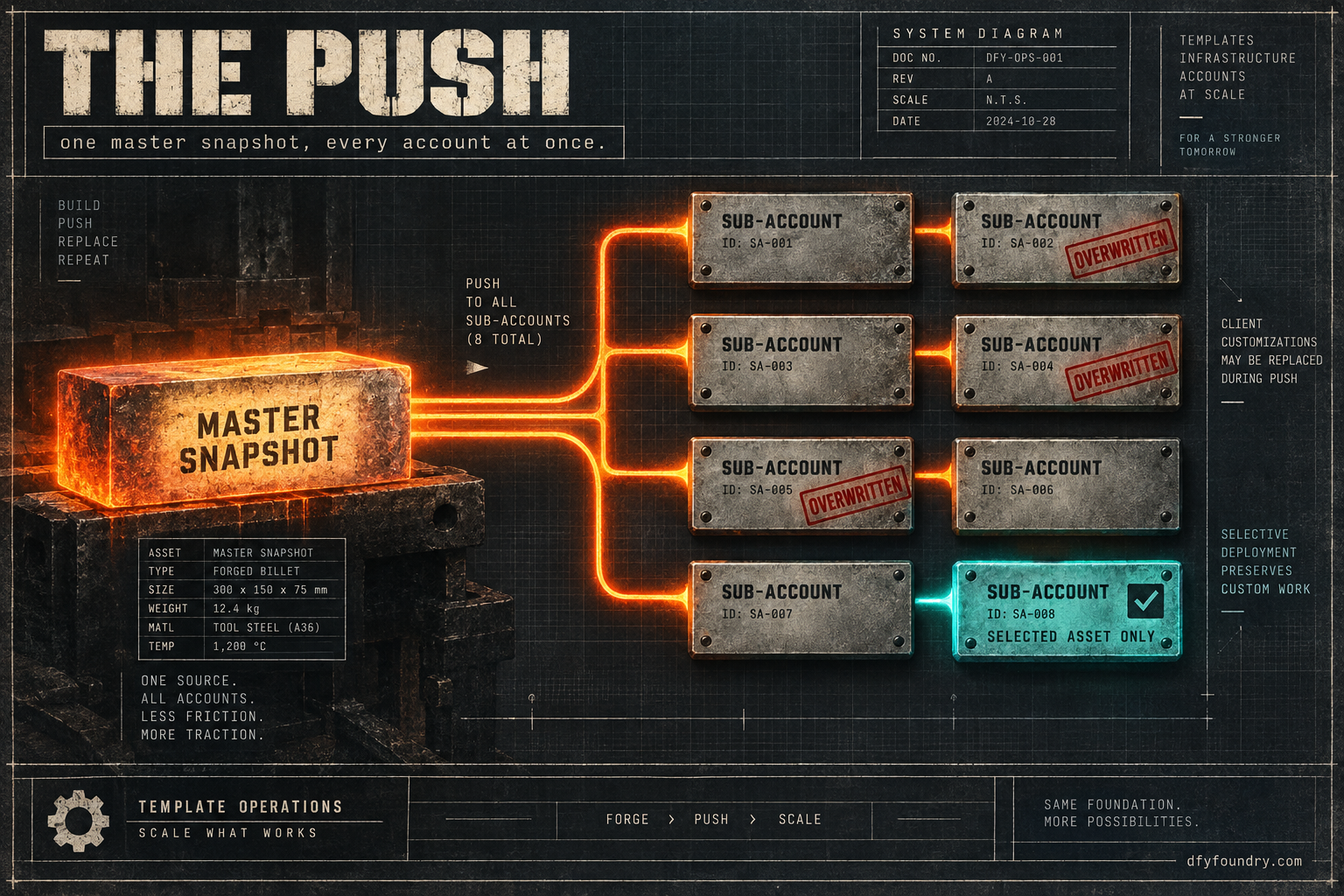
You changed one thing. A single line in the intake workflow, the delay before the first follow-up, because a client on the roofing account wanted a tighter chase. You fixed it in your master, opened the snapshot, refreshed it, and pushed the update to every sub-account running that build, because that is the whole reason to keep a master: fix it once, ship it everywhere. The push ran overnight. You went to bed.
Monday morning a different client calls. Not the roofing one. The dental one. They want to know where their custom reminder step went, the one you built in August, the one they paid you two hours to wire in because their front desk wanted a same-day nudge the other clients never had. It is gone. The workflow has snapped back to the master version: clean, correct, and missing the one thing that made it theirs. The push you sent to tighten the roofing chase reached into the dental account and replaced a workflow that had a client’s paid customization living inside it.
Nothing errored. The push reported success on every account. The dental workflow still runs. It just runs the way it ran the day you first installed it, because that is exactly what a snapshot update is built to do, and nothing in the flow told you which of your accounts it was about to reach into on the way through.
A snapshot update is a one-way overwrite, not a sync
The mistake underneath that Monday call is a model of how snapshots behave that most agencies carry without noticing, until a push proves it wrong. People treat a master snapshot like a shared document: edit the master, and the copies keep up. A snapshot is not that. It is a frozen casting of an account at one moment. It does not watch the source, it does not watch the deployed accounts, and it does not reconcile the two. Every movement between a master and the accounts running it is manual, and every movement goes one way at a time.
Nothing moves until you move it
There are two directions, and both are blocked by default. Changes you make in the source account do not reach the snapshot on their own. You have to refresh the snapshot to pull the source’s current state into it, which GoHighLevel treats as a deliberate step precisely because the snapshot is meant to stay still until you say otherwise (HighLevel, Refresh or Update Snapshots). Changes a client or you make inside a deployed sub-account never travel back up into the snapshot at all. So the master and every account drift apart the instant anyone edits either side, and they stay drifted until you force a movement.
That is the part worth sitting with. The dental client’s custom step was never in your master. It lived only in their account, added after install, invisible from the master you were editing. When you refreshed the snapshot off a source that never had that step, and pushed, the push had no idea the step existed. It did not decide to remove it. It replaced a whole workflow with the master’s version of that workflow, and the master’s version simply did not contain the step. Absence, not malice. The result on the client’s side is identical either way.
The push screen is where the account is decided
When you push an update to accounts where a snapshot is already deployed, GoHighLevel does not do one uniform thing to everything. It sorts assets into two piles. Assets that are new, that do not already exist in the target account, get added. Assets that already exist as snapshot-linked items, workflows and campaigns among them, get replaced with the snapshot’s current version, and the edits sitting in the target copy are lost unless you duplicate them out first (HighLevel, Pushing and Loading Snapshot Updates to Client Accounts). A funnel the client built themselves, with its own name, that your snapshot has never heard of, is left where it is. The intake workflow that came from the snapshot and then got a step added is in range, because it still answers to the snapshot’s identity for that asset.
This is why the asset selection screen is not a formality to click through. It is the moment you decide what the push is allowed to touch. You can skip every conflict and then hand-pick only the assets you actually changed, which is the difference between sending one corrected workflow and re-stamping the whole build over a live account. Most of the damage a push does is done by sending everything when you meant to send one thing.
There is a faster path, and it is the dangerous one. GoHighLevel offers a bulk option that proceeds without stopping on conflicts, and that option defaults to overwrite and copies the assets straight in (HighLevel changelog, Snapshot Enhancements). It exists to make a mass rollout quick. It also removes the one screen that would have shown you the dental workflow before it vanished. HighLevel has since added protection so that attaching a snapshot surfaces conflicts before anything is overwritten, and so sub-account customizations are guarded by default rather than quietly replaced (HighLevel changelog, sub-account customizations are protected). That protection is real and it is recent, which means two things: it may be behind a setting in your agency, and you should never assume it is on for the push in front of you. Open the conflict screen and look.
What a snapshot cannot touch
The flip side of the overwrite is a set of things an update can never reach, and agencies lose time expecting it to. A snapshot carries structure: funnels, workflows, pipelines, calendars as objects, custom values and custom fields, forms and surveys. It does not carry the account’s connections. The phone number, the A2P brand and campaign registration, the calendar’s link to a real Google or Outlook login, the authenticated sending domain, the integrations, the team members and the billing all live in the account and never in the snapshot. That is the same reason a fresh install never arrives able to send, and it is covered end to end in the handover pass. For updates it means one blunt thing: if what is broken is a number that will not send or a calendar booking into the wrong account, no push will fix it, because the push does not carry that layer. You are editing the wrong account entirely. Fix the connection in the account that has it.
The faults a push hides until a client finds them
A push reports success per account and moves on. The faults it leaves do not announce themselves, because the accounts keep running. Here is where they hide.
The push overwrites a client’s paid customization
What you see. The push succeeds everywhere. Days later a client asks where a specific step, message or branch went. The workflow still runs, correctly, as the master version.
What is wrong. The client’s change lived only in their account, added after install, and was never in your master. A refresh pulled a source that did not have it, and the push replaced the whole workflow with the version that did not have it. The customization was not deleted by name. It was overwritten by a replacement that happened not to include it.
The fix. Before any push, know which accounts carry per-client work and which are untouched since install. Keep those in separate, client-named workflows that your snapshot has never owned, so a push cannot reach them. On the push itself, skip the conflicts and select only the assets you changed. If you already overwrote one, the client-named-asset habit is also what lets you rebuild it without guessing, because the record of what was special lives outside the thing the push can reach.
The same workflow ends up live twice
What you see. After an update, a contact gets two of the same text, or enrols in two near-identical workflows, or a pipeline has two stages that look the same. Nothing is broken, exactly. Everything just happens twice.
What is wrong. When the asset coming in does not match an existing one cleanly, by identity or by name, a push can add a second copy rather than replace the first. Now both are live. The old one still has its trigger and still catches contacts, and the new one catches them too. A duplicate is worse than a plain failure, because a failure is silent and a duplicate sends. The client hears about the one that double-texts their leads.
The fix. After a push, open the target account and read the workflow and pipeline lists for pairs. Confirm each trigger lives on exactly one copy. Delete the stale duplicate rather than pausing it, because a paused copy is a thing someone turns back on in six months. Then push a single test contact and watch how many times it enrols.
“Proceed without conflicts” runs the overwrite you were avoiding
What you see. You chose the quick bulk option to save an afternoon across many accounts. The rollout finishes in minutes. Over the next week the support messages arrive from accounts you did not think you were changing.
What is wrong. The bulk no-conflict path defaults to overwrite and skips the screen that would have let you deselect. It did exactly what it says: it proceeded, and it overwrote. The speed you bought was the speed of not looking.
The fix. Treat the bulk path as a tool for a clean mass rollout to accounts with no per-client work, never as the default for a live book of mixed accounts. When accounts differ, push per account or per small group, with the conflict screen open, selecting the changed assets. It is slower. It is slower than a working day of unpicking a live account while a client watches, which is the alternative.
You pushed a master you had not finished
What you see. Every account now carries the change you made, and the mistake you made with it: a trigger pointing at a tag that does not exist in these accounts, a message with a placeholder you never filled, a branch wired to the wrong calendar. It is in all of them at once.
What is wrong. A push multiplies whatever is in the master, correct or not. The reach that makes a master worth keeping is the same reach that ships a half-finished edit to your whole book in one move. A single account lets you catch a mistake on one client. A push lets you catch it on all of them, after.
The fix. The master gets the same handover pass a client account gets before it ships, and the push gets a pilot. Push to one account you can afford to break, ideally an internal or demo account, and read the result as a client would: fire the real trigger, send the real message, book the real slot. Only when the pilot is clean does the push go wider. The custom values and fields that go blank are the single most common thing a rushed master carries into every account, so read those first.
What a careless push actually costs
The reason to slow a push down is not neatness. It is a meter running and a client’s trust spending down, and the arithmetic is worth doing with your own figures rather than mine. Treat every number below that is not a published price as a labelled assumption and put your own in.
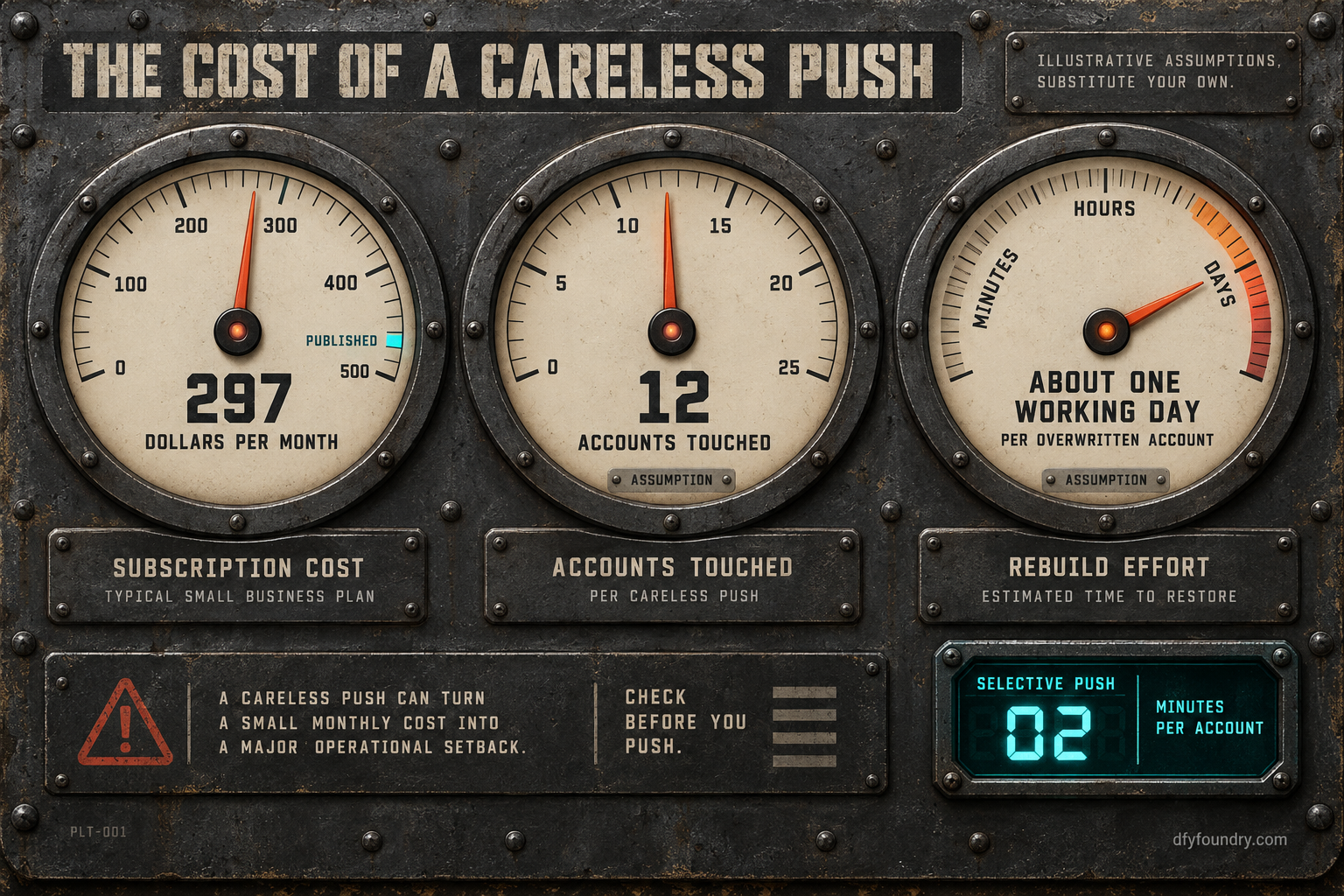
Start with the meter, which is the one hard number here. A HighLevel Unlimited plan runs $297 a month on the prices published in 2026, and that charge runs per account from the day the account exists (GoHighLevel). A push that overwrites a client’s paid work does not pause that meter. The client keeps paying their retainer into an account that now does less than it did on Friday, and you keep paying HighLevel for the privilege of having broken it.
Now the redo, which has no clean published number, so the next figures are labelled assumptions you should replace. Say a bad push overwrites a client customization on three of your accounts before anyone notices. Say each one costs you a working day to rebuild, because you cannot take a live account down to fix it and you are reconstructing a change you made months ago from memory. Put your own blended rate on three days. Against that, the selective push, the one where you skip conflicts and pick the single changed asset, costs you a few minutes of reading the conflict screen per account. On a book of a dozen accounts that is an afternoon of care against three days of repair, and the three days do not include the retainer a client cancels after they find the fault before you did.
The method matters more than my figures. Count your accounts. Decide honestly how many carry per-client work a push could reach. Put a rebuild time and your rate on an overwrite, and a per-account review time on a careful push. The gap between the two is the price of the conflict screen, and it is almost always smaller than it looks and far smaller than the repair. How wide your book can get before this arithmetic breaks is the same ceiling covered in how many accounts an agency can actually manage.
The objections, answered straight
“A master is the whole point. Are you telling me not to push updates?” The opposite. Push. A master you can update is worth more than sixteen accounts you edit by hand, and the saved hours are real. The discipline is not whether to push, it is what the push is allowed to touch. Send the one asset you changed, not the whole build, and send it to the accounts that need it, not reflexively to all of them. A master used with a conflict screen open is a tool. A master pushed blind is a way to make one mistake sixteen times.
“HighLevel protects customizations now, and I keep backups anyway.” Both are true and neither is a guarantee. The protection is recent and may sit behind a setting in your agency, so it is a thing to confirm on the push in front of you, not a thing to assume. Backups help, but a workflow overwritten in a live account is not a file you restore in one click, and HighLevel’s own feature requests include restoring a deleted workflow, which tells you how people feel the day they need it and cannot (HighLevel, restore deleted workflow request). The reliable protection is the habit: client-named assets the push cannot reach, and a pilot account that takes the mistake instead of a client.
“If the push problem lands on me either way, why pay you to run the builds?” It is a fair question, and the honest answer is that the push decision stays yours whoever builds the snapshot, because it is a decision about your accounts, not about the build. What a build off our floor changes is everything around that decision. The master arrives versioned, so you know what is in each release and what a push will carry. The per-client work is kept in client-named assets by default, so a push has nothing of theirs to reach. And when an agency would rather not own the master or the push at all, that is what ongoing fulfilment is for: we hold the master, we run the pilot, we push. If you want the build but intend to run your own updates, buy the build and keep the discipline, because the snapshot is only ever as safe as the push behind it. Either way the numbers are on the pricing page, and either way the rule below is the same.
Before you push
A master snapshot is the best thing an agency can own and the fastest way to break a book of accounts, and it is both for the same reason: a push multiplies whatever you send across every account you send it to. The accounts drift from the master the moment anyone edits either side, the push flows one way and overwrites what it lands on, and the only thing standing between a fix and a fault is the screen you were tempted to click past.
So make the push a decision, not a reflex. Refresh off a clean source. Pilot on one account you can afford to break and read it as the client would. Then push the one asset you changed, to the accounts that need it, with the conflict screen open. Keep every per-client change in an asset the push cannot own. Do that and a master stays what it is supposed to be, which is time back. Skip it and you find out on a Monday which of your clients the push reached into. That is the whole difference, and it is the same one every time a build goes out right or wrong: whether an HVAC company snapshot or a dental clinic snapshot arrives on a master you can update on purpose, or one you can only ever push and hope. Never push to an account you have not decided to push to.
Questions on this
It can. On a push, GoHighLevel adds assets that are new and replaces existing snapshot-linked items such as workflows and campaigns with the snapshot's current version. Any edit a client or you made inside the sub-account after the first install is replaced unless you skip that asset or duplicate it first. New funnels you never touched are left alone, but anything carrying the same identity as a snapshot asset is in range.
No. A snapshot is a frozen copy, not a live link. Edits made in a deployed sub-account never travel back to the source, and edits in the source never reach deployed accounts until you refresh the snapshot and push it. The flow is one way and manual in both directions, which is why a master and its accounts drift apart the moment anyone edits either side.
Refresh the snapshot from a clean source, push to one account you can afford to break first, and on the asset screen skip the conflicts and select only the assets you actually changed. Read the result in that pilot account before you send it anywhere else. A push to every account at once, with conflicts left on overwrite, is the one that reaches into a workflow you forgot a client had paid you to customize.
No. Numbers, A2P registration, calendar connections, domains and integrations are per-account connections that a snapshot never carries, so an update cannot push or repair them. If sending or booking is broken, the fault is in the connection layer of that one account, not in the snapshot, and it has to be fixed in the account itself.