ST-02 · HEAT
A2P 10DLC Registration for a GoHighLevel Agency
Registering A2P 10DLC across a batch of GoHighLevel sub-accounts: brand, campaign, carrier tiers, where registration quietly fails, and the real pass-through fees per account.
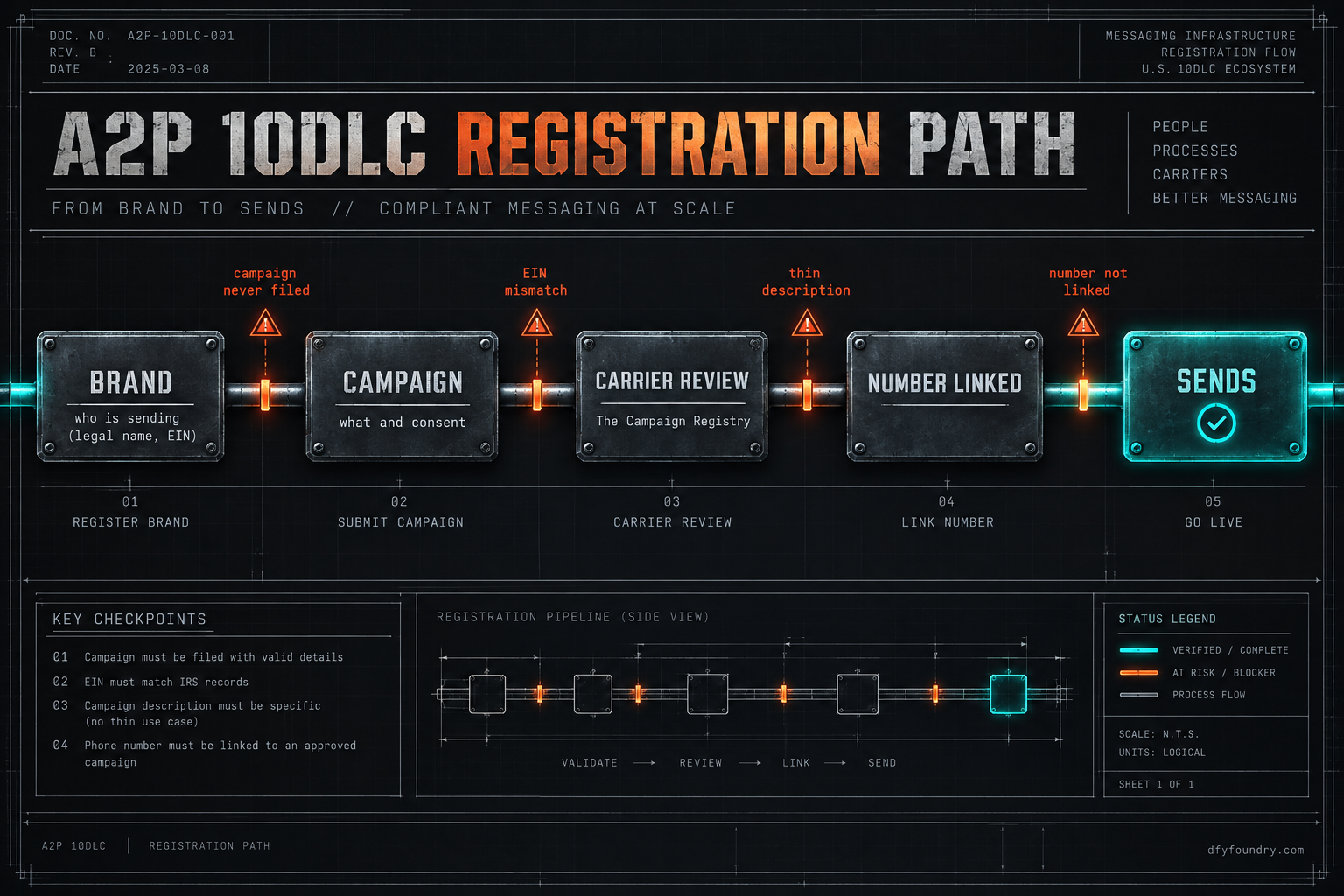
It is a Tuesday, mid-morning, and you are onboarding three client sub-accounts in one sitting. You imported the builds yesterday. Workflows green, funnels live, calendars wired. You filed A2P for all three before lunch, moved on, and told two of the clients they were good to text by Friday. On Thursday the first client’s appointment reminders go out fine. The second client’s go nowhere, and the trust panel reads “rejected.” The third never left “pending” because the campaign was never submitted, only the brand. Same three accounts, same hour of work, three different states, and you find out two days before go-live that only one of them can actually reach a phone.
None of that is a bug in the build. It is the registration underneath it, and registration is the one part of a GoHighLevel hand-over that behaves like a filing with a government office rather than a setting you flip. It has a queue, it has reviewers, it rejects on details that look fine to you, and it runs on carrier rules that change without asking. This is the reference for getting it right across a batch of sub-accounts, so the account you hand over on Friday is one that sends.
What registration actually is, underneath
A2P 10DLC is the system US carriers use to decide whether application-to-person texting from a normal ten-digit long code is allowed to pass. “Application to person” means a business platform sending to a consumer, which is exactly what every GoHighLevel workflow does when it fires a reminder or a nurture text. Since February 2025 the major carriers block unregistered 10DLC traffic outright rather than throttling it (Twilio). There is no sending around it and no grace volume worth counting on. An unregistered number is a number that does not text.
Registration has two parts, and the order matters. First the brand: the identity of the sending business, its legal name, its EIN or tax ID, its address and website, filed through The Campaign Registry, the central body carriers trust to vouch for senders (Twilio). The brand answers “who is sending.” Then the campaign: a description of what the messages are, how recipients opted in, and a sample of the message itself, linked to the number that will send it. The campaign answers “what are they sending and did anyone agree to receive it.” A brand with no campaign is an identity with nothing approved to send. That is a real and common half-finished state, and it looks almost identical to a finished one in the panel.
Inside GoHighLevel the whole filing lives in the sub-account, not at the agency level. Open the sub-account, go to Settings, then Phone Numbers, then the Trust Center, and start the A2P 10DLC registration there (HighLevel). HighLevel’s phone system is LeadConnector, which runs on Twilio underneath, so the fees and the rules you are meeting are Twilio’s and the carriers’, passed through. HighLevel states plainly that A2P fees are pass-through from The Campaign Registry, Twilio and the mobile carriers, with no markup added (HighLevel). That is useful to know because it means the cost is not a GoHighLevel invention you can negotiate, it is a toll on the road.
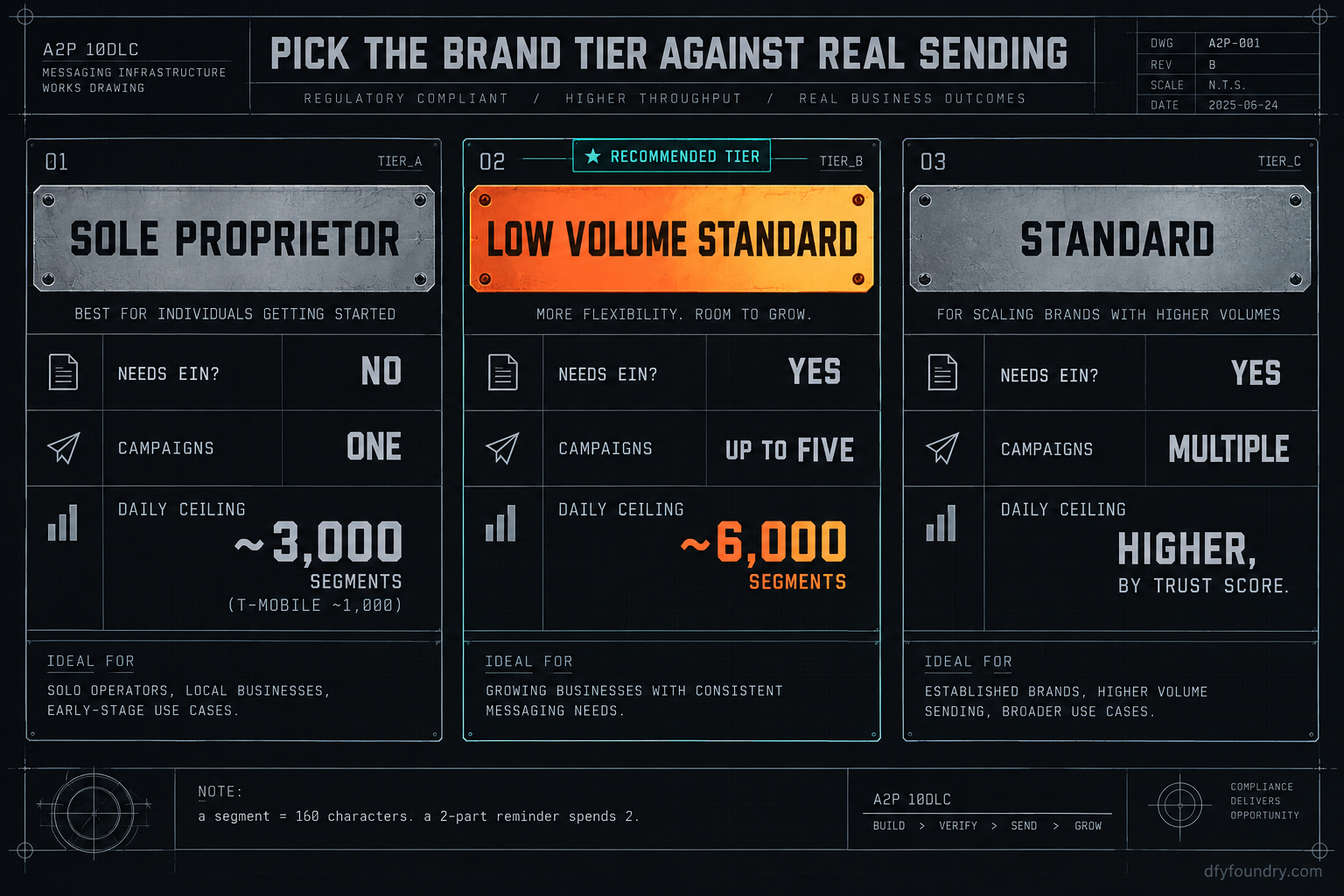
The brand you file determines the lane you get. The tiers that matter to an agency are Sole Proprietor and the two standard tiers. A Sole Proprietor brand is for a business without an EIN, is limited to a single campaign, and is capped at roughly 3,000 SMS segments a day across carriers, with T-Mobile holding it tighter at around 1,000 a day (Twilio). A Low Volume Standard brand needs a valid EIN, allows up to five campaigns under the one brand, and lifts the ceiling to roughly 6,000 segments a day (Twilio). Above that sits the full Standard tier for genuine volume. One important unit here: a “segment” is 160 characters of SMS, so a long two-part reminder spends two segments, and a client who thinks they send a few hundred texts a day can be spending double that in segments. The tier is not a formality. It is the daily ceiling your client’s sending runs into.
| Brand tier | Needs EIN | Campaigns allowed | Rough daily segment ceiling |
|---|---|---|---|
| Sole Proprietor | No | One | ~3,000 across carriers, ~1,000 on T-Mobile |
| Low Volume Standard | Yes | Up to five | ~6,000 across carriers |
| Standard | Yes | Multiple | Higher, set by brand trust score |
Pick the tier against the client’s real sending, not the cheapest box. A busy clinic running reminders, confirmations and no-show recovery on a Sole Proprietor brand will hit the T-Mobile ceiling on a normal day and watch half its texts stop, with nothing on screen explaining why.
The places registration quietly fails
The symptom is nearly always the same from the client’s seat: texts stop, or never start, and the account looks fine. What is actually wrong sits in one of a handful of filings. Work them in this order.
One: the brand cleared but the campaign was never submitted
What you see. The trust panel shows the brand approved. You move on, satisfied. Texts do not send.
What is wrong. Approval of the brand is only the first of the two filings. The campaign, the thing that actually authorises a message type on a number, is a separate submission, and it is easy to file the brand, see a green state, and assume you are done. A brand with no approved campaign carries no sending rights at all.
The fix. Back in the Trust Center, confirm there is an approved campaign, not just an approved brand, and that your sending number is linked to it. If the campaign is missing, file it. If it reads pending, you are in the queue and the account cannot send until it clears, so this is the link that sets the go-live date.
Two: the brand details do not match the business’s public record
What you see. The brand filing comes back rejected, sometimes within minutes, sometimes after a day, with a reason that reads like boilerplate.
What is wrong. The Campaign Registry checks the legal name, EIN and address against third-party business records. A client who gives you their trading name instead of their registered legal name, or an EIN with a typo, or an address that does not match their filing, gets rejected on the mismatch. This is the single most common rejection, and it is entirely about data entry, not about the business being legitimate.
The fix. Get the exact legal name and EIN from the client’s own tax documents, not from their website or their memory. Enter them character for character. If it was rejected, correct the specific field that is wrong and resubmit rather than starting a fresh brand, which only multiplies the fees.
Three: the campaign description or sample is too thin to approve
What you see. The brand is approved, the campaign is rejected or stuck in extended review.
What is wrong. Carriers want the campaign to state what the messages are, how the recipient consented, and what a real message looks like, including the business name and a way to opt out. A campaign described as “customer notifications” with a sample that reads “Hi, your appointment is confirmed” and no business name, no STOP language and no stated opt-in path does not give a reviewer enough to approve. Vague is the enemy. So is a sample that does not match the stated use case.
The fix. Write the campaign description as if explaining it to someone who has never seen the account: the business sends appointment reminders and follow-ups to people who booked through its website form and ticked a consent box. Put a sample message in that names the business and ends with “Reply STOP to opt out.” Make the opt-in method you describe the one the account actually uses.
Four: the use case is restricted, so it will never approve
What you see. Repeated rejection no matter how cleanly you file.
What is wrong. Carriers prohibit whole categories outright. SHAFT content, which is sex, hate, alcohol, firearms and tobacco, is blocked, and so are high-risk financial and lending categories such as payday loans and some debt services. A client in one of those niches cannot register a standard 10DLC campaign for that content, and no amount of tidy filing changes it. This is rare across the sixteen trades we build for, but it is worth knowing before you promise a client texting you cannot deliver.
The fix. Check the use case against the carrier prohibited list before you file, not after three rejections. If the content is genuinely restricted, the honest answer to the client is that SMS on a standard long code is not available for it, and the conversation moves to compliant channels rather than more filings.
Five: the number is approved but not linked to the campaign
What you see. Brand approved, campaign approved, and the account still sends nothing. Every status reads green.
What is wrong. A campaign authorises a message type, but the carrier only carries traffic from a number that is actually attached to that approved campaign. A number provisioned after the campaign cleared, or a number carried in with a build that points at a different account’s registration, sits outside the approval. The filing is done and the number is not in it, so the texts leave GoHighLevel and the carrier drops them as unregistered.
The fix. In the Trust Center, open the approved campaign and confirm the sub-account’s sending number is listed against it. If you added the number later, associate it now. If a build arrived with a number baked into the send steps, replace it with the one provisioned and linked here, and never ship a number that belongs to another account.
A trap sits above all five of these and is worth naming on its own: registering one brand for your agency and assuming it covers every client. It does not. Each sub-account that sends is its own business to the carriers, with its own brand and its own campaign. A batch of ten client accounts is ten brand filings and at least ten campaigns, and treating it as one is how an agency ends up with nine silent accounts and no idea why.
The numbers, and the one nobody quotes
The fees are small per account and add up by the batch, and because they are pass-through you are paying the registry and the carriers, not HighLevel (HighLevel). Use real figures and do the arithmetic with your own account count, not mine.
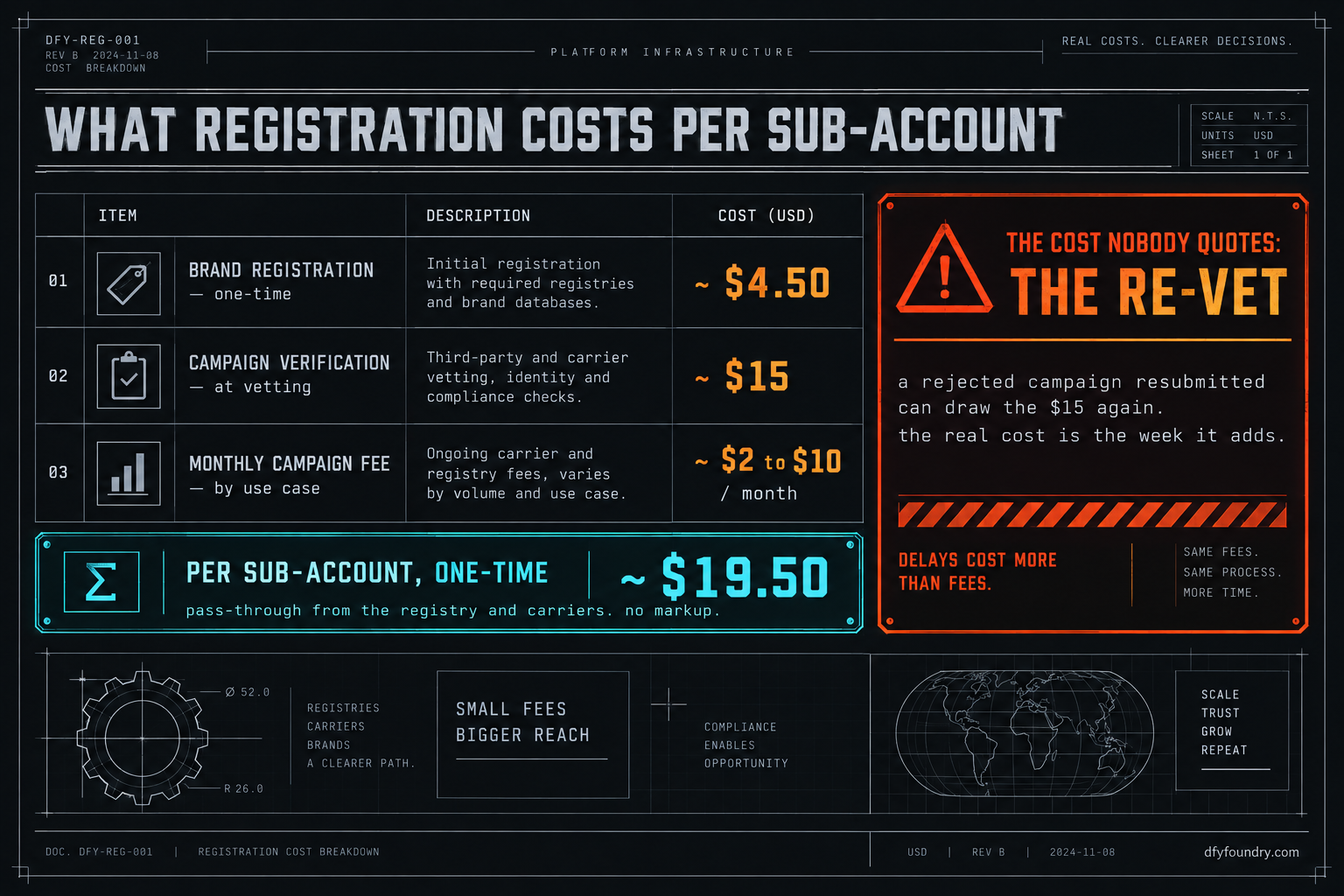
On Twilio’s own rate table the one-time brand registration runs about $4.50, the campaign verification fee is $15 charged at vetting, and the monthly campaign fee sits at roughly $2 for a sole-proprietor campaign and up to about $10 a month for standard use cases (Twilio). Those are the three line items. Lay them out per sub-account:
- One-time, per sub-account: about $4.50 brand plus $15 campaign verification, so roughly $19.50 to get a single account filed.
- Monthly, per sub-account: about $2 to $10 depending on the tier and use case.
Now scale it with a labelled input. Call your batch N sub-accounts, and suppose N is eight. The one-time cost to file all eight is 8 times $19.50, which is $156. The monthly carrier toll, if those are standard use cases at $10, is 8 times $10, which is $80 a month, or $16 a month if they qualify as sole-proprietor at $2. Substitute your own N, and your own split between sole-proprietor and standard, and the figure moves accordingly. The method is the point, not the total.
Here is the cost nobody puts on the quote: the re-vet. The $15 verification fee is charged at vetting, and a campaign that gets rejected and resubmitted can draw that fee again (Twilio). File three sub-accounts carelessly, get all three bounced on a name mismatch, and the fee is not $45, it is $90, and the real cost is not the money. It is the week each rejection adds to a client who was promised Friday. The expensive part of registration is never the toll. It is doing it twice.
The objections, answered straight
“The fees are tiny and the form is public, I will just do it myself.” You should, if you have filed enough of them to know where they bounce. The fees genuinely are small. The cost that bites is the rejection loop: a brand filed with a trading name, a campaign with a thin sample, a Sole Proprietor tier chosen to save a step that then caps the client’s sending. Each one looks fine until it is rejected, and each rejection is days, not minutes. If you run this often, the knowledge is the asset and you do not need us. If you run it twice a year, you relearn the gotchas every time, on the client’s clock.
“A2P is overkill for a client who barely texts.” Volume is not the question any more. Since the February 2025 enforcement the carriers block unregistered 10DLC traffic regardless of how little it is (Twilio). A client who sends ten texts a month still sends zero of them from an unregistered number. There is no volume low enough to skip it, only a volume low enough that you notice the failure late.
“Why pay you when registration is a form I can fill in?” Because the form is the easy half, and the account is only as live as its slowest filing. What a commissioned build buys is that the sub-account leaves the floor with the brand filed against the right legal details, the campaign written to approve the first time, the tier matched to the client’s real sending, and the number linked and tested with a live message to a handset that is not yours. Delivery is within 24 business hours of purchase confirmation, business hours being nine to five Central, Monday to Friday, so a Friday-afternoon order lands Monday. Installation is free with every build, and it comes with 15 hours of dedicated installation support to use within eight days of purchase, covering the install, the website rebrand, A2P and 10DLC registration, email domain setup and a few extra automations where the build needs them. Third-party integrations and custom software sit outside that and are quoted before any work starts. If your time is worth more than the price of a build like the dental clinic snapshot, handing the registration to the floor is the cheaper trade. If it is not, the four failure modes above are yours to run, in order, for free.
Before you promise a client a go-live date
Registration is the part of a hand-over that does not care how good the build is. The workflows can be perfect and the account still sends nothing until the brand and the campaign clear, and clearing them runs on a queue you do not control and a set of carrier rules that reject on details that look fine to you. So treat it as the long pole in every onboarding, not the afterthought.
File early. File per sub-account, never once for the agency. Enter the legal name and EIN from the client’s tax documents, not their website. Write the campaign so a stranger could approve it, with a sample that names the business and offers STOP. Match the brand tier to what the client will actually send, counting segments, not messages. Then confirm an approved campaign, not just an approved brand, and push a live lead through to a phone that is not yours before you tell anyone they are live. If you would rather the account arrive already filed, matched and tested, that is what a commissioned build is, and what a legal practice snapshot or any build in the catalogue ships as. The full setup sits in the account setup service, the numbers for a finished build are on the pricing page, and if the texts are already filed and still not landing, the send-path teardown traces the other four places a message dies. Either way, the rule holds: no account is live until you have watched it send.
Questions on this
Every US sub-account that sends SMS files its own brand and its own campaign. Registration is tied to the sending business and the number inside that sub-account, not to your agency login and not to the snapshot. One agency-level filing does not cover client traffic, so a batch of ten sub-accounts is ten brand filings and at least ten campaigns.
The filing itself takes a few minutes in the Trust Center. A clean standard brand with a matching EIN often clears within a business day, and the campaign is the slower half, commonly five to seven business days. A rejected filing restarts that clock, so register a week before the client is due to go live, not the morning of.
The fees are pass-through from The Campaign Registry and the carriers, and HighLevel says it adds no markup. Expect a small one-time brand fee, a per-campaign verification fee charged at vetting, and a monthly campaign fee that varies by use case. The number nobody quotes is the re-vet: a rejected campaign resubmitted can draw the verification fee again.
No. A snapshot carries structure, the workflows and the message copy. Registration is a connection between a specific business, a specific number and the carriers, and none of that lives in the file. The build imports clean and still cannot send until the brand and campaign are filed for that sub-account.
The common causes are brand details that do not match the business's public records or EIN, a vague campaign description that does not state what the messages are and how people opted in, a sample message with no business name or opt-out language, or a use case the carriers prohibit. Fix the specific field and resubmit rather than refiling from scratch.