ST-04 · QUENCH
Why GoHighLevel Snapshots Won't Send SMS or Email
Your imported GoHighLevel snapshot looks live but no text or email lands. The send path from workflow to carrier, the five places it dies, and the fix for each.
It is 4:40 on a Friday. You imported a plumbing snapshot into a client’s fresh sub-account an hour ago. The pipelines are there. The workflows show green. The funnel loads on the first try. You push a test lead through the intake form, watch the contact land in the pipeline exactly where it should, and wait for the confirmation text.
Nothing arrives.
You check your phone. You check the spam folder for the confirmation email. You open the contact record and the workflow reads as completed, every step ticked. Everything on the screen says the account works. The one thing that matters, a message reaching a person, did not happen. Monday morning the client’s first real lead fills in the same form, hears the same silence, and calls the shop asking why the website is broken. It is not broken. The account imported clean and behaves exactly as it was built. It just cannot send.
This is the most common way a snapshot hand-over goes wrong, and it is the worst to catch, because nothing on the screen turns red. A build that fails loudly gets fixed in the first hour. A build that quietly sends nothing gets handed to a client, and you find out when they do. So before you hand over another account, it is worth knowing exactly how a message travels inside GoHighLevel, and every place along that path where a fresh install drops it on the floor.
A message is a chain, not a button
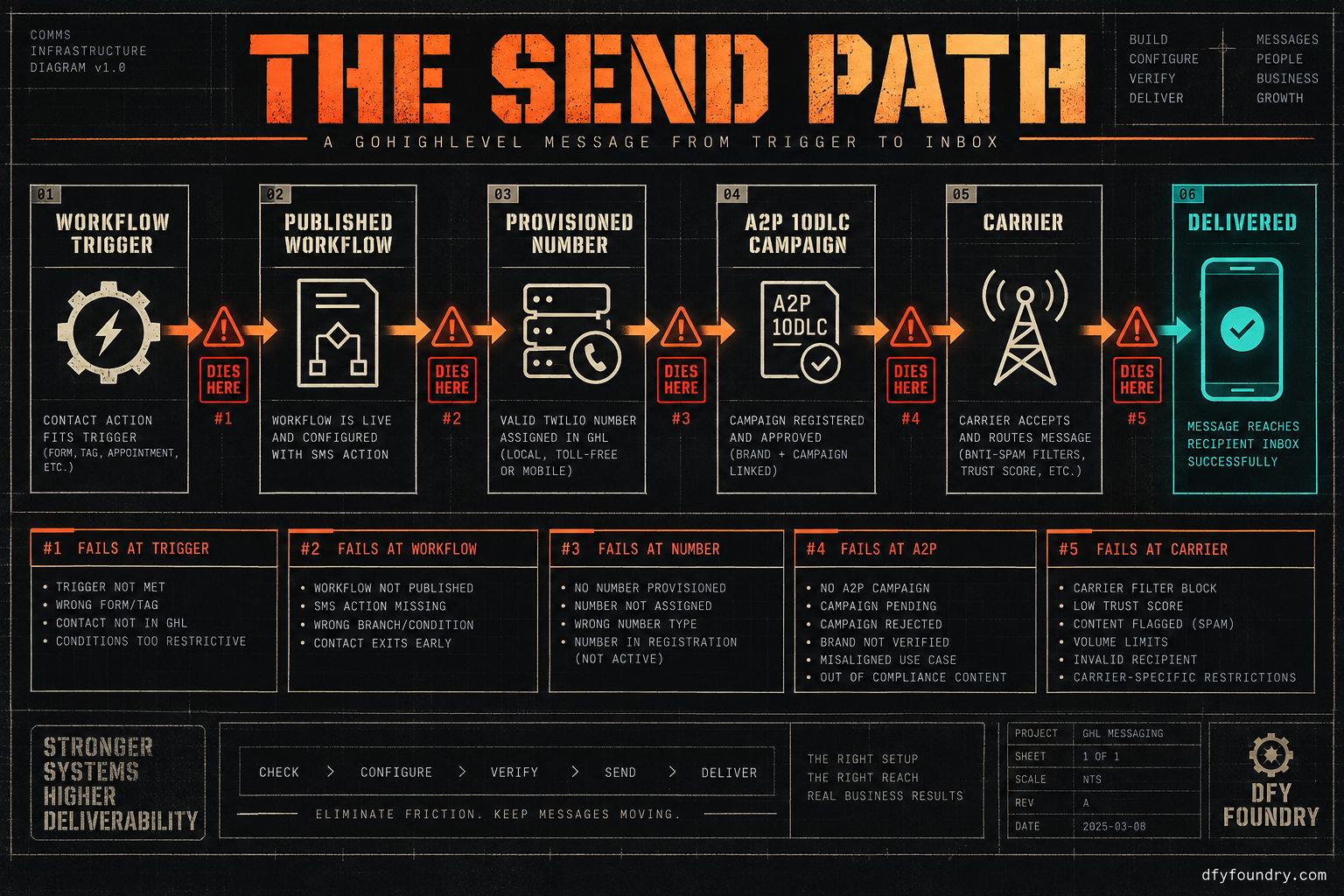
When a workflow “sends an SMS,” it is not one thing firing. It is a chain of links, and every link has to hold or the message never reaches a handset. Most people picture the send as the moment they see it in the builder. The real journey starts there and runs a good deal further.
Trace a text end to end. A contact hits a trigger, a form submission, a booking, a tag. The workflow that owns that trigger has to be published, not sitting in draft. The send step needs a from-number, an actual provisioned phone number attached to this sub-account. That number has to sit under an A2P 10DLC brand and an approved campaign, the registration US carriers now demand before they will carry business texting on a standard ten-digit number. Only then does the message leave GoHighLevel’s phone system, reach the carrier, clear the carrier’s filter, and light up a screen. Five links, and the builder shows you the first one.
Email runs its own chain. The workflow fires, the send-email step hands the message to a from-address, that address lives on a sending domain, and the domain has to be authenticated so the receiving server trusts it came from who it claims. Google and Yahoo check for SPF, DKIM and DMARC on inbound bulk mail and route a large share of the unauthenticated stuff to spam or reject it outright, a standard they began enforcing in February 2024 (Mailgun). A message that technically sent can still never be seen.
Underneath both chains sits the message body itself. GoHighLevel messages lean on custom values, the placeholders that hold the business name, the booking link, the offer, the reply-to. The snapshot carries the workflow that references {{custom_values.booking_link}}. It does not always carry the value. Drop that build into a fresh sub-account and the workflow still fires, but the text it sends can go out half-empty, or the condition that was supposed to gate it never matches, because the thing it is checking against was never recreated.
Here is the sentence that explains all of it. A snapshot carries structure, not connections. The funnels, the workflows, the pipelines and the message copy are structure, and they travel inside the file. The provisioned number, the carrier registration, the authenticated domain and the calendar connection are connections, and none of them are in the file. They have to be filed and wired for the specific sub-account, every time, from scratch. When a hand-over dies, it almost always dies on a connection the file was never going to carry.
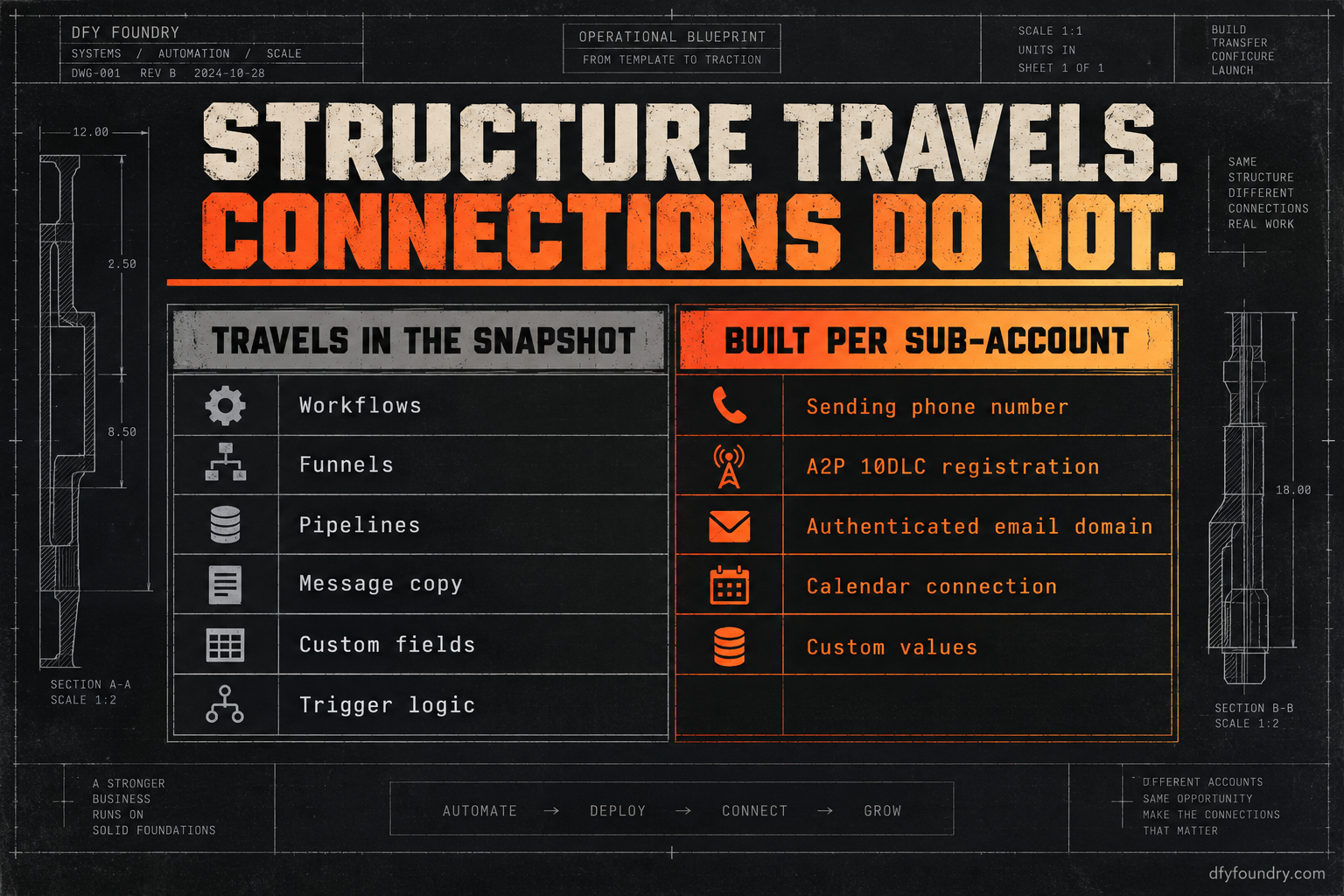
| Travels inside the snapshot | Has to be built per sub-account |
|---|---|
| Workflows, funnels and pipelines | A provisioned sending phone number |
| Email and SMS message copy | A2P 10DLC brand and campaign registration |
| Custom fields and value slots | Authenticated sending domain (SPF, DKIM, DMARC) |
| Forms, surveys and calendars as objects | Calendar connection to a real Google or Outlook account |
| Trigger logic and workflow conditions | The custom values the copy and conditions read from |
Read the right-hand column again. Every line is a thing that makes the account able to send or book, and not one of them arrives with the import. That is the whole problem in a table.
The five places it dies
The symptoms all look the same from the outside: a lead comes in and nothing reaches them. What is actually wrong sits in one of five places. Work them in this order, because it runs cheapest first.
One: the workflow is still in draft
What you see. The workflow looks built. The steps are all there. You test and nothing sends.
What is wrong. In GoHighLevel a workflow has a publish toggle separate from being saved. A snapshot can carry a workflow in draft state, and a draft workflow will accept a contact, show the enrolment, and run none of the send actions. It is the single most common cause and the fastest to miss, because a draft looks identical to a published one until you notice the toggle.
The fix. Open Automation, then Workflows, and check the publish state on every workflow the account depends on, not just the one you tested. Publish each. Re-run the test lead and confirm the send step now executes rather than skips.
Two: no A2P 10DLC registration
What you see. The workflow fires, the SMS step runs, GoHighLevel may even mark the message queued or sent, and the handset stays dark.
What is wrong. Since February 2025 the major US carriers, AT&T, T-Mobile and Verizon, block unregistered application-to-person traffic from ten-digit numbers outright (Infobip). Registration is two parts: a brand that identifies the sending business, and a campaign that describes the use case and links the number, both filed through The Campaign Registry (Twilio). None of that is in the snapshot. A fresh sub-account has no brand and no campaign, so its texts hit the carrier and stop.
The fix. File the brand and campaign for this sub-account. GoHighLevel walks the registration in its own trust flow (HighLevel). Filing takes a few minutes. Approval usually lands in five to seven business days, so this is the link that decides your go-live date, not the install. Register early, and do not promise the client live texting before the campaign clears.
Three: no number, or the wrong number
What you see. The SMS step in the workflow shows no from-number, or shows one that belongs to a different account.
What is wrong. A provisioned phone number is a connection, so it does not travel in the file. Worse, a carelessly built snapshot can carry a workflow that still references the builder’s own number, which either fails silently or, if it somehow sends, sends from a number your client does not own and cannot receive replies on. That is the texting equivalent of the calendar that books into somebody else’s Google account.
The fix. Provision a number inside this sub-account and set it as the sending number on every SMS action. Check the workflows for any hardcoded number that came in with the build, and replace it. A snapshot should never ship with a live number baked into a send step, and if one did, treat the rest of that build with suspicion.
Four: the sending domain is not authenticated
What you see. Emails send, and they land in spam, or bounce, or simply never get opened because they never reached the inbox.
What is wrong. The sending domain has no SPF, DKIM or DMARC records aligned, so Gmail and Yahoo cannot verify the mail and treat it as suspect. The bulk-sender rules that took effect in February 2024 are explicit: authenticate, keep the spam complaint rate under 0.3 percent, and offer one-click unsubscribe, or watch inbox placement collapse (Mailgun). An unauthenticated domain is the email version of an unregistered number.
The fix. Authenticate the sending domain in GoHighLevel’s email settings, publish the DNS records it generates at the registrar, and send from a subdomain the client controls rather than a shared address. Then send a real test to a Gmail address and a Yahoo address and confirm both land in the inbox, not the promotions tab and not spam.
Five: the custom values are missing
What you see. The message sends, but it goes out with a blank where the offer or the link should be, or a workflow that was supposed to branch never branches.
What is wrong. The copy and the conditions reference custom values the snapshot expected to find, and the fresh account does not have them. GoHighLevel does not throw an error for a missing value. It sends the empty version. The same gap breaks trigger conditions that read a value that is not there, so the workflow runs the wrong branch or no branch. It catches people out because a custom value and a custom field look alike in the builder and are not the same object, and a snapshot can carry the field it writes to while the value it reads from arrives blank, so the send goes out hollow.
The fix. Recreate every custom value the build reads from, and fill it with this client’s real details before the first send. Then re-run the test and read the actual text and email that arrive, word for word, checking that every placeholder resolved to real content.
The cost of an account that cannot send
The reason this matters is not tidiness. It is money leaving on a timer, and the arithmetic is worth doing with your own numbers rather than mine.
Start with what you are already paying. A HighLevel Unlimited plan runs $297 a month, on prices published in 2026 (GoHighLevel), and that meter runs whether the account sends or not. An account that imported clean and cannot send is a subscription you are paying for a client who is getting nothing.
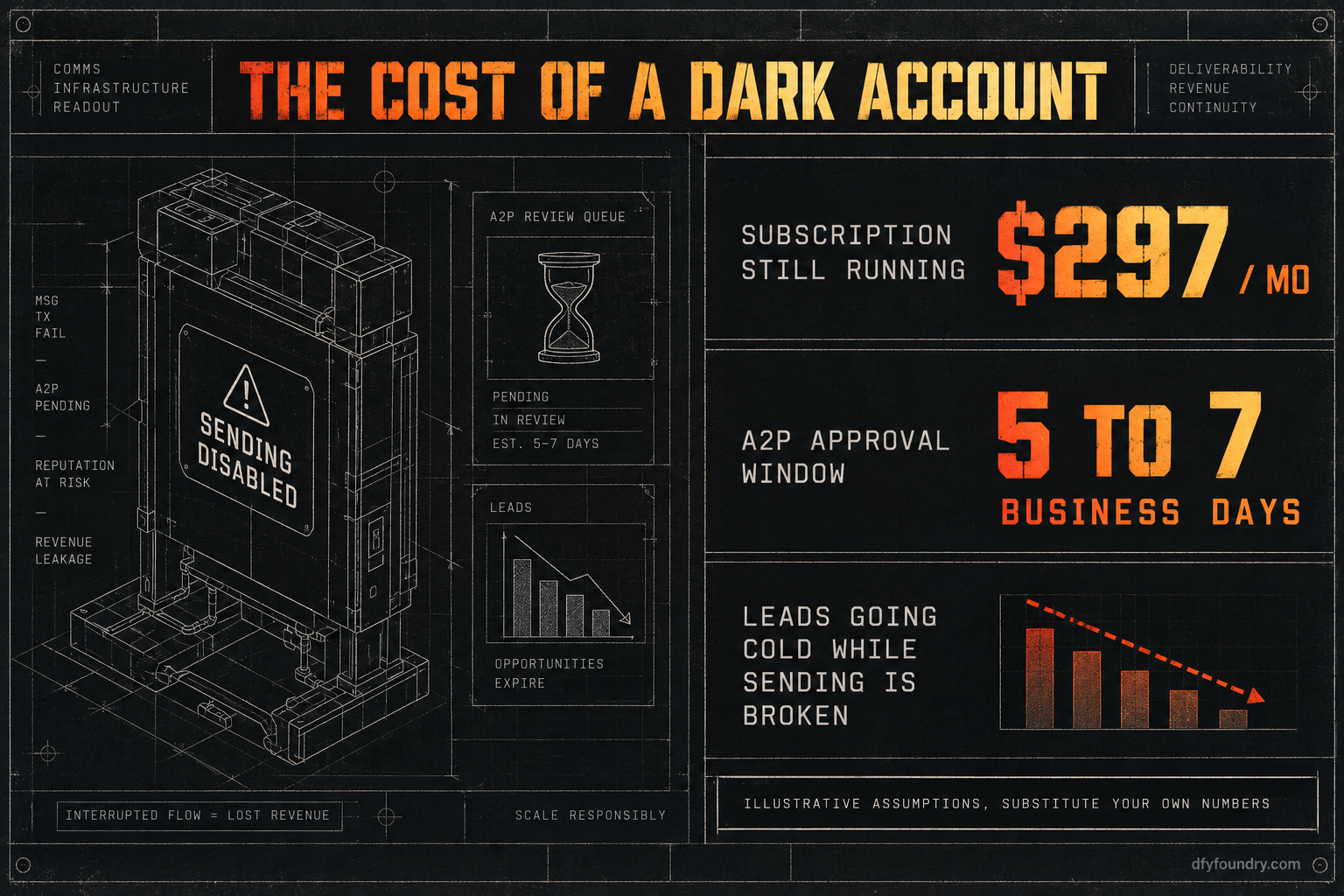
Now the lead side. Assume a modest inbound flow for a single trade sub-account: label it fifteen new leads a week. Assume, as an input you can change, that fast follow-up wins roughly a third of them when the account works and a tenth when the lead sits in silence for a day. That gap, from about five bookings a week to about one and a half, is three and a half bookings lost every week the account is dark. Put a conservative $400 of client value on a booked job and the account is leaking around fourteen hundred dollars of the client’s revenue a week while the send path is broken. None of those figures are measured results from us. They are labelled assumptions, and the point is the method: swap in your lead count, your close rate and your ticket size, and the number tells you how long you can afford to leave a hand-over half-finished.
The window is not short, either. A2P approval runs five to seven business days (Twilio), and if you only start the filing after the client signs, that is a week of dark texting on top of whatever it takes you to notice. This is why the appointment reminders and no-show recovery a snapshot ships are tuned toward a 70 percent no-show recovery target rather than a single timed nudge, and it is why none of that tuning is worth anything until the send path underneath it can actually deliver. A recovery sequence that cannot reach the phone is a recovery rate of zero.
Email carries its own slow cost. Cross the bulk threshold, five thousand messages a day to Gmail from one domain, without authentication in place and you do not just lose today’s campaign, you teach the receiving servers to distrust the domain (Mailgun). Deliverability, once it drops, is slow to come back. The cheapest time to authenticate is before the first send, not after the reputation is already dented.
The objections, answered straight
“I can register A2P and authenticate a domain myself, it is free.” You can, and if you have done it before, you should. The registration fees are small and the steps are public. The failure mode is not the doing, it is the half-doing: a brand filed but no campaign, a campaign filed with details that do not match the client’s public records and gets rejected, DNS records generated but never published at the registrar. Every one of those leaves an account that looks configured and still cannot send. If you run this path often enough to know where it snags, run it. If you do not, the risk is a client going live on an account that fails on their first lead.
“It worked when I tested it, so it is fine.” Test sends from your own number and to your own inbox are the least reliable proof there is. Your number may already be trusted, your inbox may already whitelist you, and low-volume one-off sends dodge the exact carrier filtering and spam scoring that hit a live campaign at real volume. A message marked delivered inside GoHighLevel only means the platform accepted it, not that the carrier carried it. Test to a handset and an inbox you do not control, at the volume the client will actually send.
“Why pay you when the fix is a checklist I can run?” Fair, and the checklist is above, in order, for free. What you buy from us is that the account leaves the floor with the connections already made: the number provisioned, the A2P brand and campaign filed, the domain authenticated, the custom values populated, and a live lead pushed through to confirm every link holds before your client ever logs in. Delivery is within 24 business hours of purchase confirmation, business hours being nine to five Central, Monday to Friday, so an order placed Friday afternoon lands Monday. Installation is free with every snapshot, and it comes with 15 hours of dedicated installation support to spend within eight days of purchase, covering the install, the website rebrand, A2P and 10DLC registration, email domain setup and a few extra automations where the build needs them. Third-party integrations and custom software sit outside that and are quoted before any work starts. If your hours are worth more than the price of a build like the plumbing business snapshot, buying the finished account is the cheaper trade. If they are not, run the checklist.
Before the next hand-over
The account that imports clean and sends nothing is not a rare bug. It is the default state of a fresh sub-account, because the file was only ever going to carry structure. The send path is a connection, and connections get built, not imported.
So change the last step of your process. Do not treat a green workflow as a finished account. Push a real lead through the real form, publish every workflow, provision the number, file the A2P brand and campaign a week ahead of go-live, authenticate the domain, fill the custom values, and then watch a text reach a phone and an email reach an inbox that are not yours. If any of the five links is missing, you will find it on a test lead instead of the client’s first real one. That is the whole difference between a hand-over that holds and one that calls you on Monday.
If you would rather the account arrive already registered, authenticated and tested, that is what a commissioned build is, and what an HVAC company snapshot or any build in the catalogue ships as. Either way, the rule is the same. Never hand over an account you have not watched send. If you want the full pre-flight, the install guide lays out the rest of the QA pass, and the pricing page has the numbers for a finished build.
Questions on this
Because a snapshot carries structure, not connections. The workflows and message copy travel inside the file. The provisioned phone number, the A2P 10DLC registration and the authenticated email domain do not. Until those are filed and connected for this sub-account, the account looks live and sends nothing.
Yes. Brand and campaign registration is tied to the sending business and the number, not to the snapshot. Every US sub-account that sends SMS files its own brand and campaign through The Campaign Registry. Since February 2025 the major carriers block unregistered traffic outright, so there is no sending around it.
Almost always because the sending domain is not authenticated. Google and Yahoo require SPF, DKIM and DMARC on the sending domain, and route a large share of unauthenticated bulk mail to spam. Authenticate the domain in GoHighLevel, publish the DNS records, and send from a subdomain you control.
The filing itself takes a few minutes. Approval through The Campaign Registry usually lands in five to seven business days, sometimes longer if the brand details do not match public records. Plan for the account to be unable to send SMS during that window, and register before the client is due to go live.
Yes, and you should. Send a live lead through the real form, watch the workflow fire, and confirm the text reaches a handset that is not yours and the email reaches an inbox that is not yours. A message marked delivered inside GoHighLevel is not proof it left the carrier.