ST-02 · HEAT
What a GoHighLevel Snapshot Installation Costs
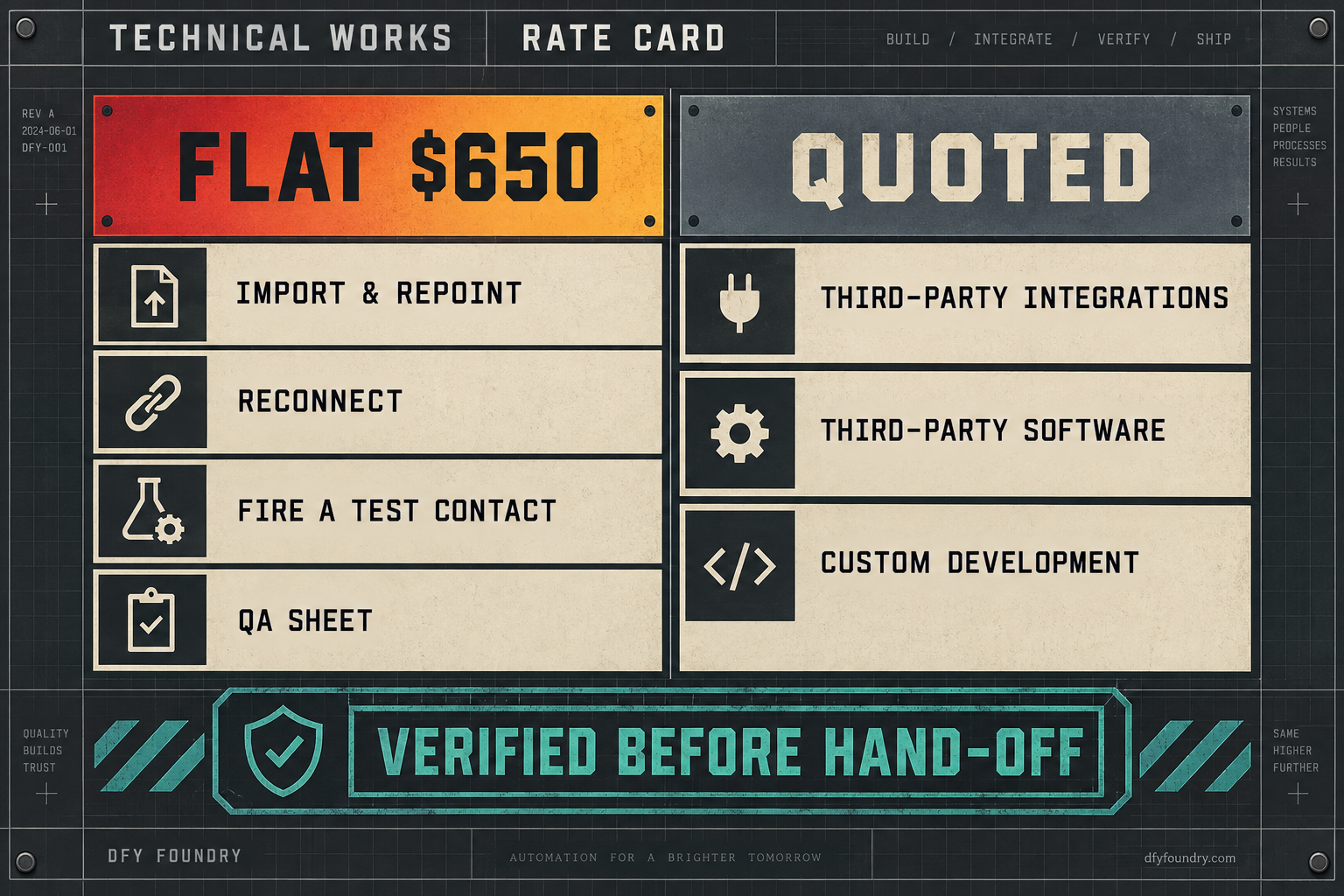
A fixed-price GoHighLevel snapshot installation runs from $650. What that flat fee buys, the five things that push a job past it, and why a flat install price works.
A roofing agency owner we talked to last month spent a Saturday installing a marketplace snapshot into a new client’s sub-account. The import ran clean. Everything looked present. He closed the laptop and told the client they were live. Monday morning the client called: a lead had booked a site visit on Friday and nobody had shown up. The booking confirmation had gone out pointing at a Google calendar that belonged to whoever built the snapshot, not to the roofer. While he was in there he found a welcome text that fired with a blank where the company name should sit, and an A2P brand that had never been registered, so half the texts the workflow thought it sent had never left the building. The weekend was gone, the client’s trust was dented, and the account still was not finished.
That is the job an installation fee is for. A snapshot is a casting. It comes out of the mould with the shape right and the connections cold, and someone has to heat the joins, repoint what still names the old account, and fire a test contact through the whole thing before a real one does. This is what that work costs in 2026, what a flat fee buys, the five places a job slips past it, and why a fixed install price is possible at all when no two accounts are the same.
Why a fixed install price is even possible
Start with the thing that confuses people, because the pricing follows from it. A snapshot install is not a copy. The share-link flow copies structure, the funnels, the workflows, the pipelines, the custom values and custom fields, the forms and surveys. It does not copy the connections those parts depend on. A calendar is a login token to somebody’s Google account, and the token does not travel. A phone number is provisioned to one sub-account and stays there. An A2P registration is tied to the account that filed it. Payment and inbox connections are account-bound. So the moment a snapshot lands, you have a complete-looking account wired to a source that is not yours.
The work of an installation is turning that cold casting into a live account. It is bounded, and that is the whole reason it can carry a flat number.
The pass, in order
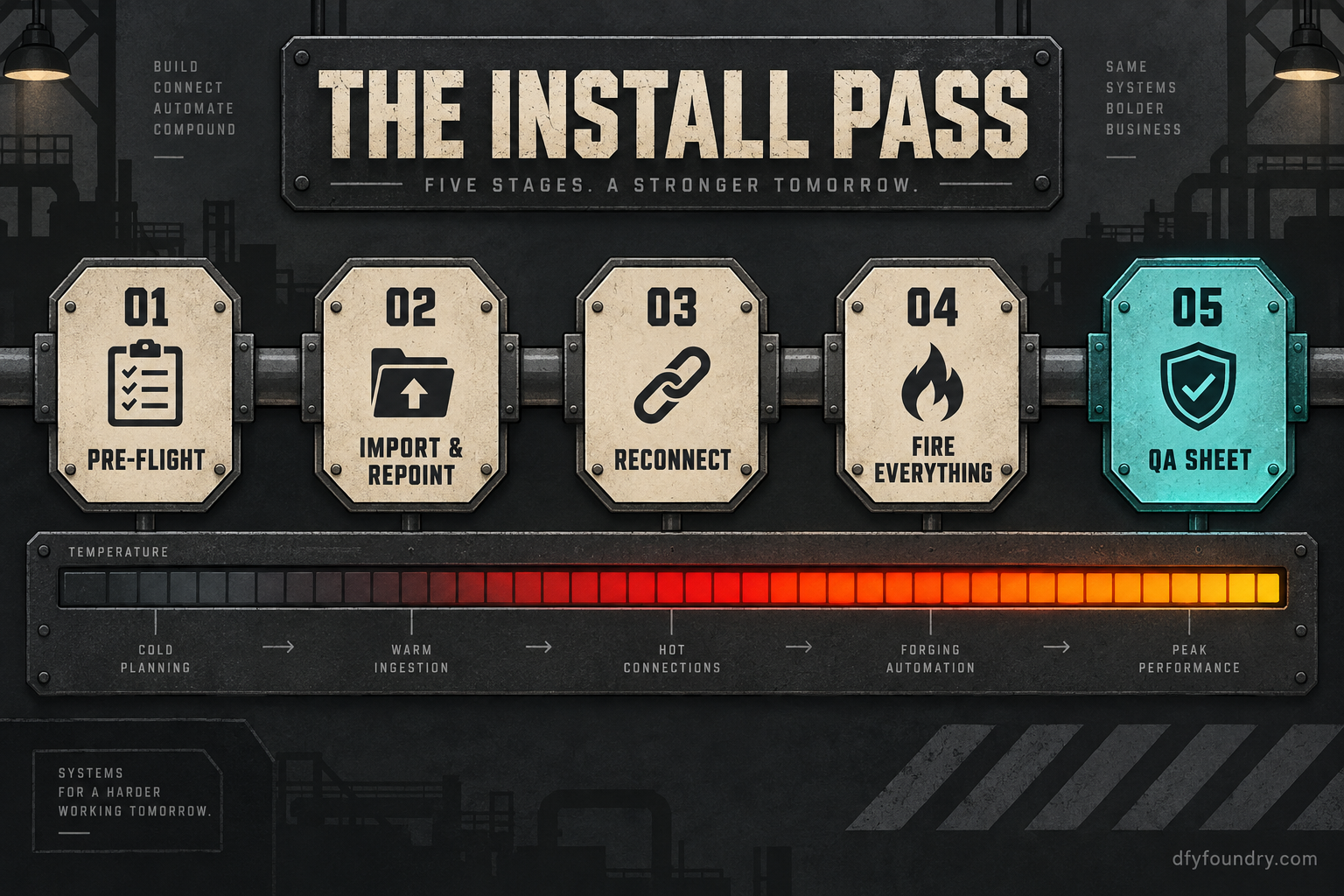
We run the same five steps on every snapshot installation, and they are the same five steps whatever trade the account is for.
First, pre-flight. Before anything imports, the destination account gets walked for conflicts: a calendar already in use, a pipeline that will collide, a phone number already provisioned. An import on top of a dirty account is how you get duplicates that take longer to unpick than the install took to run.
Second, import and repoint. The snapshot goes in, and then every reference that still names the source account gets found and repointed at the destination. This is the slow part, and it is slow in a predictable way.
Third, reconnect. Integrations do not ride inside a snapshot. Payments, inboxes, calendars and phone all get reconnected by hand to the client’s own accounts.
Fourth, fire everything. A test contact walks the full journey. Every workflow runs, every email and text is triggered, every stage change fires, and each one is checked to have actually arrived, not merely to say it was sent.
Fifth, hand over the QA sheet. You get a document listing what was tested, what passed, and anything the client has to action themselves.
Where the variability actually lives
Here is why the number holds. The work scales with the number of connection points, not with the client’s business. A chiropractic practice and a car wash have different funnels and different copy, but the install touches the same finite set of joins in both: calendars, phone and A2P, payments, inboxes, custom values and custom fields, trigger links and tracking domains. A floor that has walked that checklist enough times knows the hours it takes, so it can quote a flat figure and absorb the normal spread. What it cannot flatten is the work that sits outside the snapshot entirely, and that is exactly the line the fee draws. Third-party integrations, third-party software and custom development are unbounded in effort, so they are quoted before they start rather than folded into a fixed pass.
One distinction before the failure modes, because it changes which number applies to you. Every build in our own catalogue installs free, with fifteen hours of dedicated installation support to be used within eight days of purchase. The $650 service is not for those. It is for the snapshot you built yourself, inherited from a departing contractor, or bought somewhere else, where nobody attached install hours to the sale.
The five places a job slips past the fee
A clean snapshot into a clean account is a flat job. The fee covers it and the hours land where they are expected. What follows are the five things that turn a tidy install into a long one, each one a reason a cheap install leaves the account half-live. For each: what you see, what is actually wrong, and the fix.
The calendar books into a stranger’s Google account
What you see. Bookings succeed in the client’s view. The lead picks a slot, gets a confirmation, and then nobody on the client’s side ever sees the appointment.
What is wrong. A GoHighLevel calendar connects to a specific Google or Outlook account through an authorisation token. The snapshot copies the calendar’s settings and its booking logic, but the token points at the account that first connected it, which is the builder’s. Until it is disconnected and reconnected, every booking lands in a calendar the client cannot open.
The fix. Disconnect the inherited connection, reconnect each calendar to the client’s own account, and put a live test booking through to confirm it appears on the right side. This is in the flat pass. It is also the single most common thing a rushed self-install misses, because the calendar looks connected on the settings screen.
The texts say sent and nothing arrives
What you see. A workflow fires, the contact record shows the message as sent, and the client swears their customers never got a text.
What is wrong. US A2P 10DLC registration is tied to the sub-account that filed it, and it does not travel in a snapshot. Drop a build into an unregistered account and the platform will accept the messages and queue them, but carriers filter unregistered traffic, so the send log reads clean while the phones stay silent. We walk the full send path and where it dies in a separate piece; registration is the most expensive place it fails because it fails invisibly.
The fix. Register the brand and the campaign with compliant opt-in language, and hold a fallback plan while registration clears so the account is not dark in the meantime. Registration itself is inside the install scope. The carrier and campaign pass-through fees are not ours to charge and vary by carrier, so we do not print a figure for them here; they are billed by the platform directly to the account.
The copy sends with blanks and the routing misfires
What you see. A welcome email goes out reading “Thanks for contacting ,” with a hole where the business name belongs. A workflow that should send a hot lead to one pipeline sends it to another.
What is wrong. Snapshots carry the reference to a custom value or custom field, but an empty value produces no error. The merge field resolves to nothing and the message sends anyway. A field the workflow branches on, if it was never populated in the new account, routes everyone down the default path. We pulled this failure apart in full in why custom values and fields go blank; the short version is that the account looks built because the structure is there, and only a test contact exposes the empty spaces.
The fix. Inventory every reference the build depends on, populate the account-specific values, and fire a test contact so a blank shows up on a screen rather than in a client’s inbox.
The phone and the checkout are dead on arrival
What you see. Calls to the number on the funnel ring out or fail. A payment link opens and then errors at the point of paying.
What is wrong. Phone numbers are provisioned to one sub-account and a snapshot does not bring them. The build references a number that belongs to the source account, so nothing routes. Payment connections are the same: the snapshot carries the product and the checkout page, but the Stripe or other processor link is a per-account connection that has to be remade.
The fix. Provision the client’s own numbers and route them, then reconnect the payment processor and the email and SMS inboxes by hand and put a test transaction through. All of this is reconnection work and all of it is inside the flat pass. What is not inside it is wiring the account to a third-party tool the client already runs, a scheduling app or a proprietary CRM, because that is integration work and it is quoted.
The links and domains still point home
What you see. A trigger link in a text 404s, or clicks on it track to an account you do not control, so the client’s reporting is wrong from day one.
What is wrong. Trigger links and tracking domains resolve against the account that created them. A snapshot copies the link but not the domain verification, so the links either break or quietly attribute to the source account’s analytics.
The fix. Repoint the links, re-verify the tracking and sending domains in the new account, and confirm a click registers where it should. Small job, easy to skip, and it poisons every number the client looks at if it is skipped.
The numbers, with the arithmetic shown
Install pricing in this market runs wide, so read the figures next to what each one actually covers rather than off the sticker.
| Route | Price | What it covers |
|---|---|---|
| Our catalogue build | Free install with the build | Full five-stage pass plus fifteen hours of support within eight days |
| Our installation service | from $650 | Full five-stage pass on a snapshot you did not buy from us |
| Marketplace install, example vendor | from $299 one-time | Scope varies by vendor; often import and branding, not always reconnection |
| Typical one-time setup range | $299 to $1,250 | Spans a bare install to a fuller account build, per one vendor’s own range |
The free install on our own builds is the baseline worth naming first. Our catalogue runs $920 to $2,280, paid once and licensed for unlimited sub-accounts, and the install comes with the build at no extra charge: delivery is within 24 business hours of purchase confirmation. The full sheet is on the pricing page, and a single build like the HVAC company snapshot or the car wash snapshot carries its install with it.
The $650 installation service applies only to a snapshot that came without install hours attached. Against the wider market, that sits above a bare marketplace install, which one vendor lists starting at $299 with a two to three day turnaround, and inside the $299 to $1,250 one-time range another provider publishes for GoHighLevel setup work. Both figures are confirmed from search snippets of those vendor pages rather than independently fetched, and both exclude the part of the job that actually breaks accounts, the reconnection pass. A cheaper sticker that stops at import is not the same product as a pass that fires a test contact through every path and hands you a QA sheet.
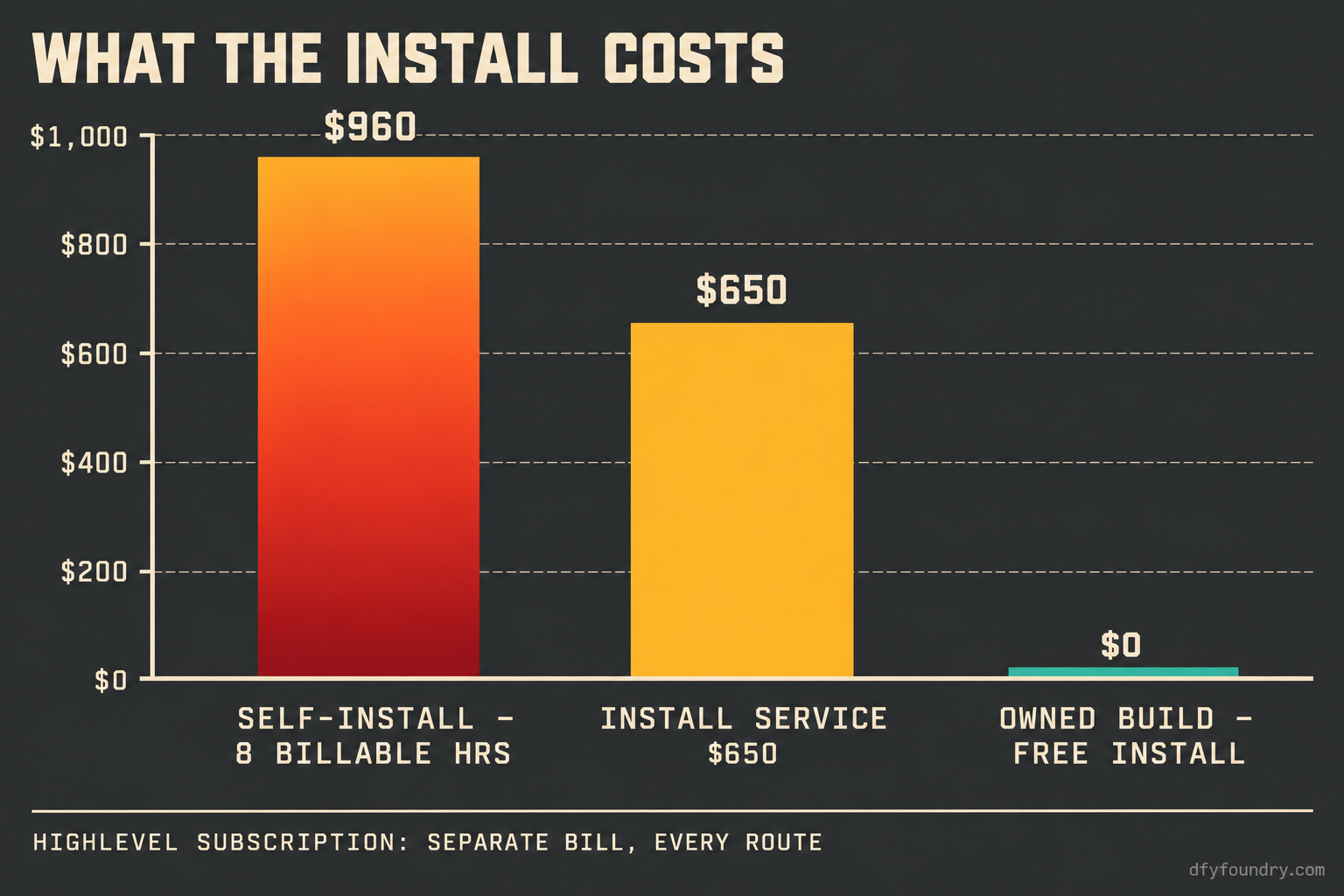
Now the self-install arithmetic, with every input on the page so you can substitute your own. Put in your real billable hour. Call it $120, a figure you should replace with yours. A clean self-install, where the snapshot is tidy and you know where every reference lives, might take three hours: 3 times $120 is $360 of your time, under the fee, so install it yourself. A messy one, the kind that ate the roofer’s Saturday, runs eight hours or more once you are hunting dead calendar tokens and unregistered A2P: 8 times $120 is $960 of your time, more than the flat $650, and that is before the hour the client’s trust costs you when the first lead falls through. The flat fee is the number that does not move while your hours do.
One cost nobody in the install line quotes is the platform itself, because it is a separate bill paid straight to HighLevel. GoHighLevel is $97 a month on Starter, $297 on Unlimited, or $497 on Agency Pro, each with a fourteen-day trial and an annual rate of $970, $2,970 and $4,970, verified on the vendor’s pricing page on 15 October 2026. Every route above pays that regardless, so it is not part of the install comparison, but it is the bill an agency forgets when it is pricing a client.
The objections, including the one against us
“I can install it myself for nothing.” You can, and on a clean snapshot you should. The fee is not magic; it is the five-stage pass carried out by someone who has done it enough times to be fast, plus a QA sheet proving the account sends before a client ever logs in. The honest test is the arithmetic above: if your billable rate times the hours a messy install eats comes out under $650, do it yourself. If it comes out over, you are paying more to save the fee than the fee costs.
“Someone else installs for $299, so your $650 is overpriced.” On the sticker, yes. The question is what each number covers. A $299 install that imports the snapshot and rebrands the funnels and stops there leaves you exactly the account the roofer had on Monday morning: present, branded, and not sending. The reconnection pass, the calendar tokens, the A2P registration, the test contact fired through every path, is the part that makes the account live, and it is the part a bare install price tends to leave out. Compare the scope line by line, not the headline. If a $299 vendor genuinely does the full reconnection and hands you a QA sheet, buy it; most do not.
“Why pay $650 at all when your own snapshots install free?” This is the one to sit with, because it argues against the fee, and it is right in the case it describes. If you are starting fresh and buying a build anyway, buy it from our catalogue and the install comes with it, free, with fifteen hours of support inside eight days. The $650 only applies to a snapshot you already own from somewhere else. So if the fee annoys you, the move is not to haggle it down; it is to buy your next build where the install is already attached. The fee exists for the orphan snapshot, not for the one bought off this floor.
“My VA can do the install.” Often true, and if your VA has done it before and works to a checklist, that is a reasonable route. The gap is rarely the import and usually the fire-everything pass, because a VA under time pressure checks that a message says sent and moves on, and sent is exactly the status that lies when A2P is unregistered. If you keep the work in-house, keep the QA sheet too, and make the test contact non-negotiable. That one discipline catches four of the five failures above.
The summary is short. A snapshot is a casting, not a finished account, and the installation is the heat that closes the joins. Priced flat because the joins are a known, finite set; quoted the moment the work leaves that set for third-party integration or custom development. On a build bought here it is free. On an orphan snapshot it is $650 well spent against the weekend it saves, and the client’s trust you do not spend twice.
Questions on this
Yes. Every build in our catalogue installs free, with fifteen hours of dedicated installation support to be used within eight days of purchase. The $650 installation service is a separate thing: it is for a snapshot you built yourself, inherited from a departing contractor, or bought somewhere else.
A pre-flight conflict scan of the destination account, the import, repointing every reference that still names the source account, reconnecting integrations by hand, firing a test contact through every workflow, email and text, and a written QA sheet listing what was tested and what passed. The flat fee covers that pass end to end.
Because it is not snapshot work. Third-party integrations, third-party software and custom software development sit outside the account by design and their effort is unbounded, so they are quoted before they start and billed as work. Nothing lands on an invoice unannounced.
Our own catalogue builds are delivered within 24 business hours of purchase confirmation. Business hours are 9am to 5pm Central, Monday to Friday, so an order placed Friday afternoon lands Monday. The separate installation service runs to the scope of the account, and anything beyond the flat pass is quoted first.
If the snapshot is clean and you know where every reference lives, you can. The fee buys back the hours and hands you a QA sheet proving the account sends before a client logs in. Price it against your own billable hour: if your rate times the hours a messy install eats is more than the flat fee, the fee is the cheaper number.