ST-03 · SPEC
Why GoHighLevel Custom Values and Fields Go Blank
Your GoHighLevel snapshot imported clean, but the copy sends blank and the workflow misroutes. Why custom values and fields fail silently on import, and the fix for each.

A med spa owner forwards you a screenshot at nine in the morning. It is the confirmation text her account just sent to her first booked client. It reads: “Thanks for booking with . Your appointment is confirmed for . Reply here to reschedule, or book again at .” Three blanks where the business name, the appointment time and the booking link should be. The client who received it has already replied asking whether the message was real.
You imported that snapshot two days ago. The funnels loaded. The workflows published green. You sent yourself a test and it looked fine, because your own test contact happened to have a name and a date on it and you were reading the words, not the gaps. What you did not do was read the exact text a stranger receives when they book cold, with none of the fields your test contact carried. The account works. It fires the workflow, it sends the text, it marks the message delivered. It just sends it hollow.
This is the quietest way a hand-over fails, quieter even than an account that sends nothing, because at least a dead send path turns something red eventually. A hollow send looks like success all the way down. The workflow completes. The message leaves. The only thing wrong is that the words a real person reads are half empty, and the client is the one who finds it. So before the next account leaves the floor, it is worth knowing exactly how custom values and custom fields travel through an import, why they look identical in the builder and behave nothing alike, and every place a fresh install lets the data fall through.
Two objects that look the same and are not
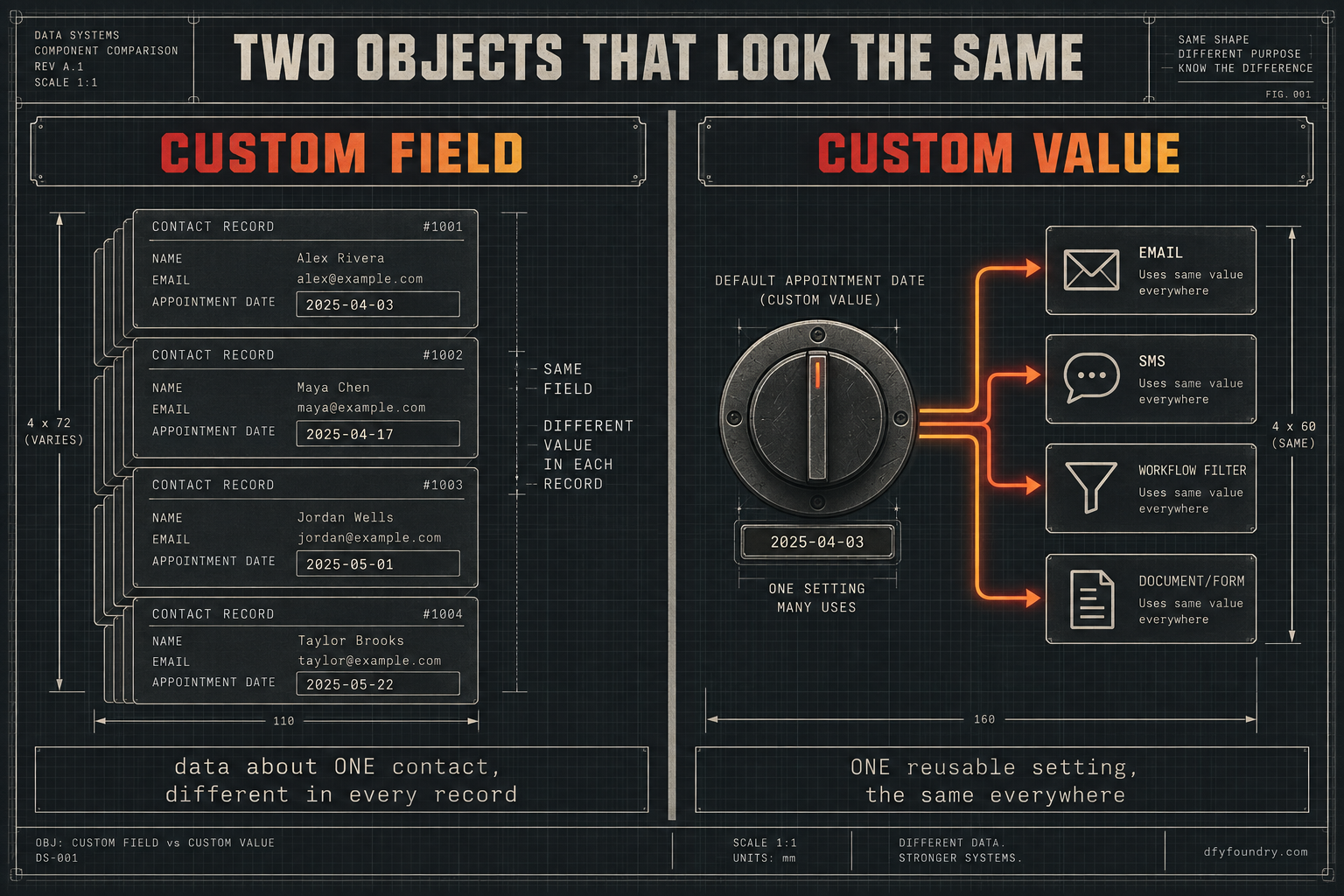
Open any GoHighLevel sub-account and you will find two settings screens that sound like the same thing. Custom fields, and custom values. In the builder they both appear as a tag you drop into a text, an email or a workflow condition. That surface likeness is the whole trap, because underneath they are different objects with different jobs.
A custom field holds data about one record. A contact, a company or an opportunity. The value changes from one record to the next, because it describes that specific person or deal: their appointment date, their quoted price, the service they asked for. A custom value holds one reusable piece of business information that stays the same everywhere it appears: the booking link, the support email, the business name, the office address (HighLevel). Think of the field as a column on a spreadsheet, a different entry in every row, and the value as a single setting you flip once and reuse across every email, text, funnel and document in the account.
That difference decides how each one behaves when you import a snapshot, and this is the sentence to hold on to. A snapshot carries structure, not data. The workflows, the funnels, the pipelines, the message copy and the definitions of your fields and values are structure, and they travel inside the file. The content those definitions point at is data, and data does not travel.
For a custom field, that means the field is created in the new account with its name and type intact, and it is completely empty of records, because contacts never ride inside a snapshot. Live CRM data, contacts, conversations, appointments and history, is left behind on purpose (HighLevel). The column exists. Every row is blank until real contacts arrive and fill it.
For a custom value, the trap is sharper. The value’s name and key import, and the stored content behind the key does not. GoHighLevel copies the placeholder and leaves it empty by design, which is why agencies keep filing requests to change it (HighLevel Ideas). So the workflow that reads {{custom_values.booking_link}} arrives fully wired to a slot that holds nothing. The tag resolves. It resolves to blank.
| Custom field | Custom value | |
|---|---|---|
| What it holds | Data about one contact, company or opportunity | One reusable piece of business information |
| Changes per record | Yes, different in every contact | No, the same everywhere it appears |
| Where you set it | On the contact record, or by a workflow | Once, in Settings, for the whole sub-account |
| A blank example | An appointment date on a brand-new lead | A booking link that was never filled in |
| What survives the import | The field definition, with no data behind it | The name and key, with no value behind it |
Now the last link in the chain, the one that makes all of this silent. When GoHighLevel renders a message and the field or value behind a tag is empty, it does not throw an error and it does not hold the send. It swaps the tag for nothing and sends the rest (HighLevel). No red flag on the contact, no bounce, no failed step in the workflow log. The platform did exactly what it was told: send the message, resolve the tags, and where a tag has no content, resolve it to empty. The gap is invisible everywhere except the phone of the person who reads it.
The places the data falls through
The symptom is always the same from where you stand. A message goes out with a blank in it, or a workflow sends the wrong contact down the wrong path, and nothing on your screen says why. What is actually wrong sits in one of the places below. Work them in this order, because it runs from the most common to the most easily missed.
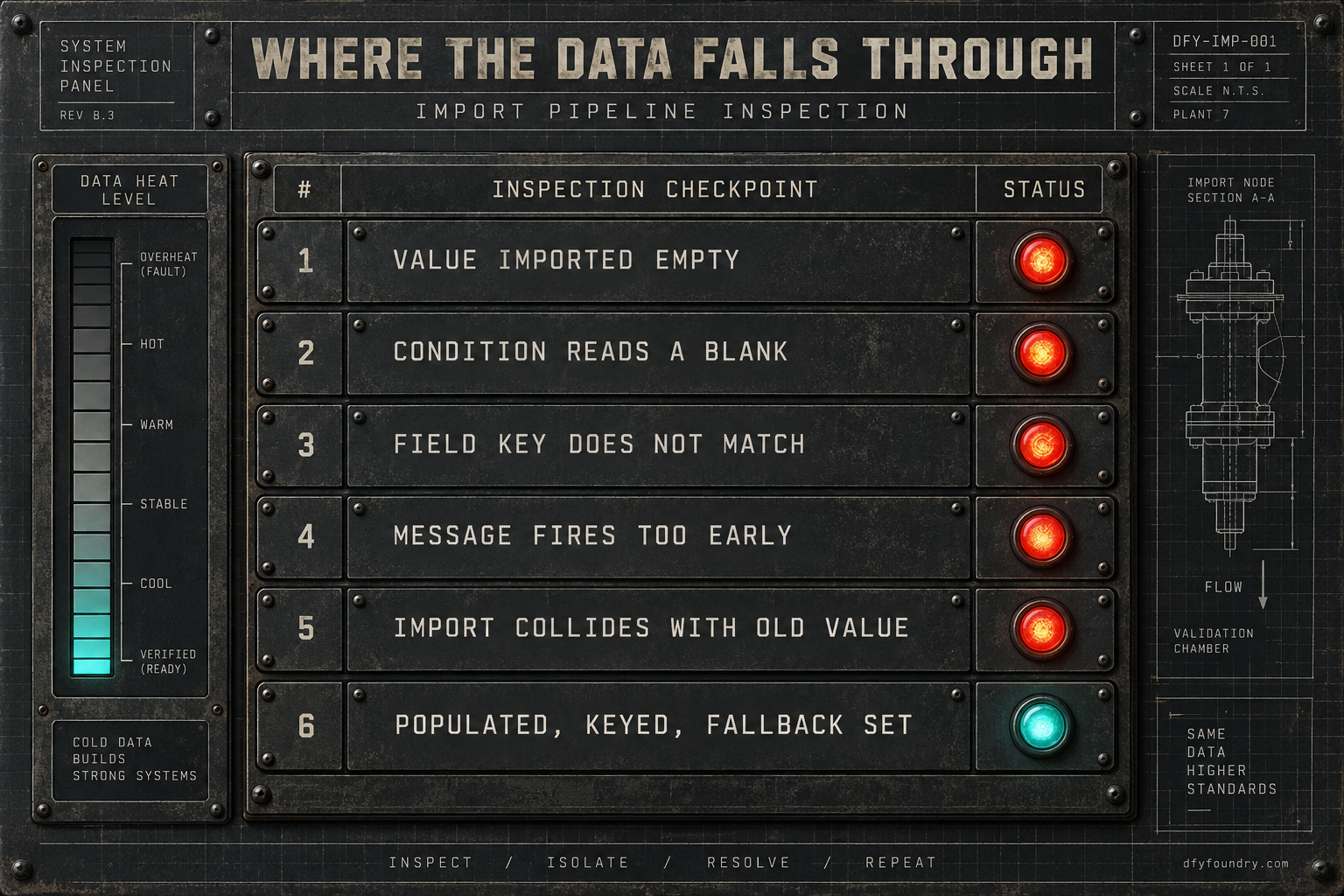
The value imported empty
What you see. A text or email lands with a gap where the business name, the offer, the address or the booking link should be. The words around the blank are perfect, which is what makes it look like a typo rather than a systemic hole.
What is wrong. The custom value the copy reads from came across as an empty placeholder. The key is there, {{custom_values.business_name}} and the rest, and every one of them points at nothing, because the snapshot was never going to carry the content. This is the single most common cause and the easiest to overlook, because the account looks fully built and the gaps only appear inside a rendered message.
The fix. Open Settings, then Custom Values, and fill every one with this client’s real details before a single contact is enrolled. Do not skim the list. A build leans on the business name, the booking link, the reply address, the office hours, the physical address and often a seasonal offer, and any one left blank is a hollow send waiting for a real lead.
The condition reads an empty value or field
What you see. Leads that should have gone to the hot pipeline stage, or triggered the fast-response sequence, quietly land in the slow nurture instead. Nobody gets a broken message. The wrong people just get the wrong treatment.
What is wrong. A workflow condition that checks a custom value or a contact field evaluates that empty read as no match. The branch that was supposed to catch high-intent leads never catches them, so they fall through to the default path. This is worse than a blank in a text, because there is nothing for anyone to see. The message that does send reads fine. The routing underneath it is wrong, and it stays wrong until someone notices the pipeline is filling in the wrong column.
The fix. For every workflow that branches on a value or a field, fill the thing it reads before you enrol anyone, and set a sensible default so an empty read has somewhere safe to go. Then push a live lead through the real form and watch which branch it actually takes, rather than trusting that a green workflow routes correctly.
The field was re-created with a different key
What you see. A merge field that resolved fine in your own account comes out blank in the client’s, even though the field clearly exists in Settings and even shows data on some contacts.
What is wrong. Somewhere in the build, a custom field was rebuilt by hand rather than carried by the snapshot, and the new one has a slightly different key or a different capitalisation than the one the copy references. GoHighLevel matches the tag to the key exactly, so {{contact.service_type}} and a field whose key came out as Service_Type are two different things to the platform (GHL Builds). The copy reads one key, the data lives under another, and the tag resolves to blank.
The fix. Check the exact key of every field the copy and the conditions reference against the key the message actually uses, character for character, in Settings under Custom Fields. Where they differ, repoint the copy at the real key rather than renaming the field, because other assets may already read the existing one. Consistency of keys is the whole game, and it is why a build made by one hand travels better than one stitched from parts.
The message fires before the data is written
What you see. A field that is definitely populated on the contact still comes out blank in a message, but only sometimes, and only in one workflow.
What is wrong. This is a timing fault, not a data fault. If a workflow sends the email or text before the step that writes the field has run, the merge reads a value that does not exist yet, and sends blank, even though the field fills in correctly a moment later. It looks like a broken field. It is a broken order of operations, and a fresh account under real conditions exposes it because live leads hit the workflow in ways your tidy test never did.
The fix. Walk the workflow in order and confirm every field a message reads is written earlier in the same run, not after. Where the data arrives from an external step, add a short wait or a field-not-empty condition before the send, so the message never fires ahead of the data it needs.
The import landed in an account that already had values
What you see. A custom value shows content, but the wrong content. An old business name, a link from a different client, a value you are sure you never set on this account.
What is wrong. You imported the snapshot into a sub-account that was not empty, and a key in the file collided with a key already present. Importing into a used account is exactly where value and key conflicts surface, and the resolution is not always the one you want (HighLevel Ideas). The account looks configured, because every slot has something in it. Some of those somethings belong to a different build.
The fix. Import into a genuinely fresh sub-account whenever you can. When you must import into a live one, audit every custom value after the import and confirm each holds this client’s content and not a leftover, rather than trusting that a filled slot is a correct slot.
No fallback anywhere in the build
What you see. Every gap above shows as a raw blank, in every message, with no safety net.
What is wrong. GoHighLevel lets you set a fallback on a merge field, a default that shows when the real value is empty, and a build that never sets one turns every missing value into a visible hole (HighLevel). A fallback does not fix the missing data. It stops the missing data from reaching a client as an empty space while you catch it.
The fix. Add a fallback to every merge field in every outbound message, so a blank reads as “our team” or “your appointment” rather than nothing. It is the seatbelt, not the brakes. You still fill the values properly, but a fallback means the one you miss embarrasses you less.
What a hollow account costs while it runs
The reason to catch this before hand-over is not neatness. It is that a hollow account bills at full price while it quietly underperforms, and the arithmetic is worth running with your own figures rather than mine.
Start with the meter. A HighLevel Unlimited plan runs $297 a month on prices published in 2026 (GoHighLevel), and that charge lands whether the account sends clean or sends blank. An account that imported fine and sends hollow is a subscription you are paying for a client whose messages are working against them.
Now the lead side, and every figure here is a labelled assumption you should replace with your own. Say a single trade sub-account takes in around fifteen new leads a week. Say, as an input you can change, that a clean, personalised confirmation and a correctly routed follow-up book roughly a third of them, while a blank text and a misrouted nurture book closer to a fifth, because a stranger who gets a broken-looking message trusts it less and a hot lead cooling in the slow path converts worse. That gap, from about five bookings a week to about three, is two bookings lost every week the account runs hollow. Put a conservative $300 of client value on a booked appointment and the account is leaking around six hundred dollars of the client’s revenue a week, none of it visible in any dashboard, because every message shows as delivered. Those are not measured results from us. They are assumptions on the page so you can recompute them: swap in your own lead count, your own close rates and your own ticket size and the method holds.
There is a reputational meter running too, and it does not reset cleanly. The appointment reminders and no-show recovery a build ships are tuned toward a 70 percent no-show recovery target, and a review request sequence is built to bring in a typical five to ten reviews a month. Both of those are targets the pieces are tuned to produce, not outcomes we promise, and both depend entirely on the messages reading like they came from the actual business. A reminder that says “your appointment is at” with nothing after it does not recover a no-show. It creates one. The tuning underneath is worth nothing until the values it reads from are filled.
The objections, answered straight
“This is a checklist. I can repopulate the values myself in twenty minutes.” You can, and the checklist is above, in order, for free. The trap is not the values you can see are empty. It is the ones that read empty only under conditions your test never hit: the condition that misroutes a hot lead, the field that blanks only when a workflow fires out of order, the key that differs by one capital letter. Those do not show on a happy-path test with your own tidy contact. They show on the client’s first cold lead. If you have run enough hand-overs to check for the silent ones by habit, run the checklist. If you have not, the risk is a client going live on an account that reads broken to every stranger who touches it.
“My test send came through perfectly.” Test sends are the least reliable proof there is, because your test contact carries the exact fields a real lead is missing, and you read the words instead of the gaps. A message that renders fine for a contact you built by hand tells you nothing about the one that arrives cold through the form with none of those fields set. Test with a contact that has nothing on it but the bare minimum a real lead submits, read the rendered message and not the template, and check the pipeline the test lead lands in, not just the text it receives.
“Why pay you when the fix is free and public?” Fair, and if your time is cheap enough, do it yourself. What a commissioned build buys is that the account leaves the floor with every value filled for this client, every field key checked against the copy that reads it, fallbacks set on every message, and a live cold lead pushed through to confirm the text reads clean and the routing lands right before your client ever logs in. Delivery is within 24 business hours of purchase confirmation, business hours being nine to five Central, Monday to Friday, so an order placed Friday afternoon lands Monday. Installation is free with every snapshot, and it comes with 15 hours of dedicated installation support to spend within 8 days of purchase, covering the install, the website rebrand, A2P and 10DLC registration, email domain setup and a few extra automations where the build needs them. Third-party integrations and custom software development sit outside that and are quoted before any work starts. If your hours are worth more than the price of a build like the med spa clinic snapshot, buying the finished account is the cheaper trade. If they are not, the checklist is yours.
Before the next hand-over
The account that imports clean and sends hollow is not a rare defect. It is the default state of a fresh sub-account, because the file only ever carried structure and the data was always going to be your job. The custom value is an empty slot until you fill it. The custom field is an empty column until real contacts arrive. Neither one errors when it is missing, so neither one warns you.
So change the last step of your process. Do not treat a green workflow and a clean import as a finished account. Fill every custom value, check every field key against the copy that reads it, set a fallback on every message, import into a fresh sub-account so nothing collides, and then push a bare cold lead through the real form and read the exact text and email it receives, word for word, watching the branch it takes. If a value is empty or a key is wrong, you will find it on a test lead instead of the client’s first real one. That is the whole difference between a hand-over that reads like the business and one that gets a screenshot forwarded to you at nine in the morning.
If you would rather the account arrive already filled, keyed and tested, that is what a commissioned build is, and what an HVAC company snapshot or any build in the catalogue ships as. If the copy sends but never reaches a phone at all, that is a different fault, and the send-path guide traces it end to end. For the rest of the pre-flight, the install guide lays out the full QA pass, and the pricing page has the numbers for a finished build. Either way, the rule holds. Never hand over an account you have not watched read clean to a stranger.
Questions on this
The name and key transfer. The stored value behind the key does not. GoHighLevel copies custom values as empty placeholders by design, so a fresh sub-account has the slot the copy reads from but nothing inside it. You fill each one for this client before the first send, or the message goes out with a blank where the value should be.
Almost always because the value behind it is empty or the key does not match. A custom value key imported without its content, a custom field with no data because contacts never travel in a snapshot, or a re-created field whose key or capitalisation differs from the one the copy references. GoHighLevel does not error on a missing value. It sends the empty version.
A custom field holds data about one contact, company or opportunity, and it changes from record to record. A custom value holds one reusable piece of business information, like a booking link or support email, that stays the same everywhere. They look alike in the builder and behave differently on import, which is why a hand-over breaks on them.
No. Populating custom values, keying custom fields correctly and setting fallbacks are part of installing the snapshot, and installation is free with every build. The 15 hours of dedicated installation support, to be used within 8 days of purchase, cover this work. Only third-party integrations and custom software sit outside it, and those are quoted before any work starts.
Fill the value the condition reads before you enrol a live contact, and set a fallback so an empty read has a safe default. Then push a real lead through and watch which branch it takes. A condition that reads an empty value evaluates as no match, so the workflow runs the wrong path in silence unless you test it against real data.