ST-05 · TEMPER
The GoHighLevel Account Handover Checklist
A GoHighLevel sub-account can pass every test and still go out with your calendar, your branding and your admin baked in. The full pre-handover QA pass, in order.
A client calls on a Tuesday, annoyed. A lead booked a consult through the shiny new calendar the night before, and the client never saw it. No notification, no card moving in the pipeline, nothing. You open the sub-account and the booking is sitting right there, clean, on the calendar, where it should be. Then you notice the calendar is still wired to a Google account, and the Google account is yours. The appointment the client’s lead booked dropped into your personal calendar, on your own phone, at home, where you glanced at it the night before, assumed it was a reminder from your dentist, and swiped it away.
That account passed every test you ran. The funnel loaded. The workflow fired. The confirmation text went out. Every light you knew to check was green. The one thing that was wrong was the one thing you never thought to check, because it had worked fine on your bench all week: the calendar booked, it just booked to you.
This is the fault a functional test never finds, because the account functions. It does exactly what it did the day you built it. The trouble is that it is still, in a dozen quiet ways, your account and not the client’s. A handover is not a test that the thing works. It is a check that it works for them, from their seat, on their connections, with your name scrubbed off it. That check has an order, and this is the order.
A handover is an ownership transfer, not a test run
Most people run a handover like a smoke test. Push a lead in, watch it land, see a text go out, call it done. That catches the account that is broken. It sails straight past the account that works perfectly and belongs to the wrong person, which is the far more common way a build goes out wrong, because nothing about it looks wrong.
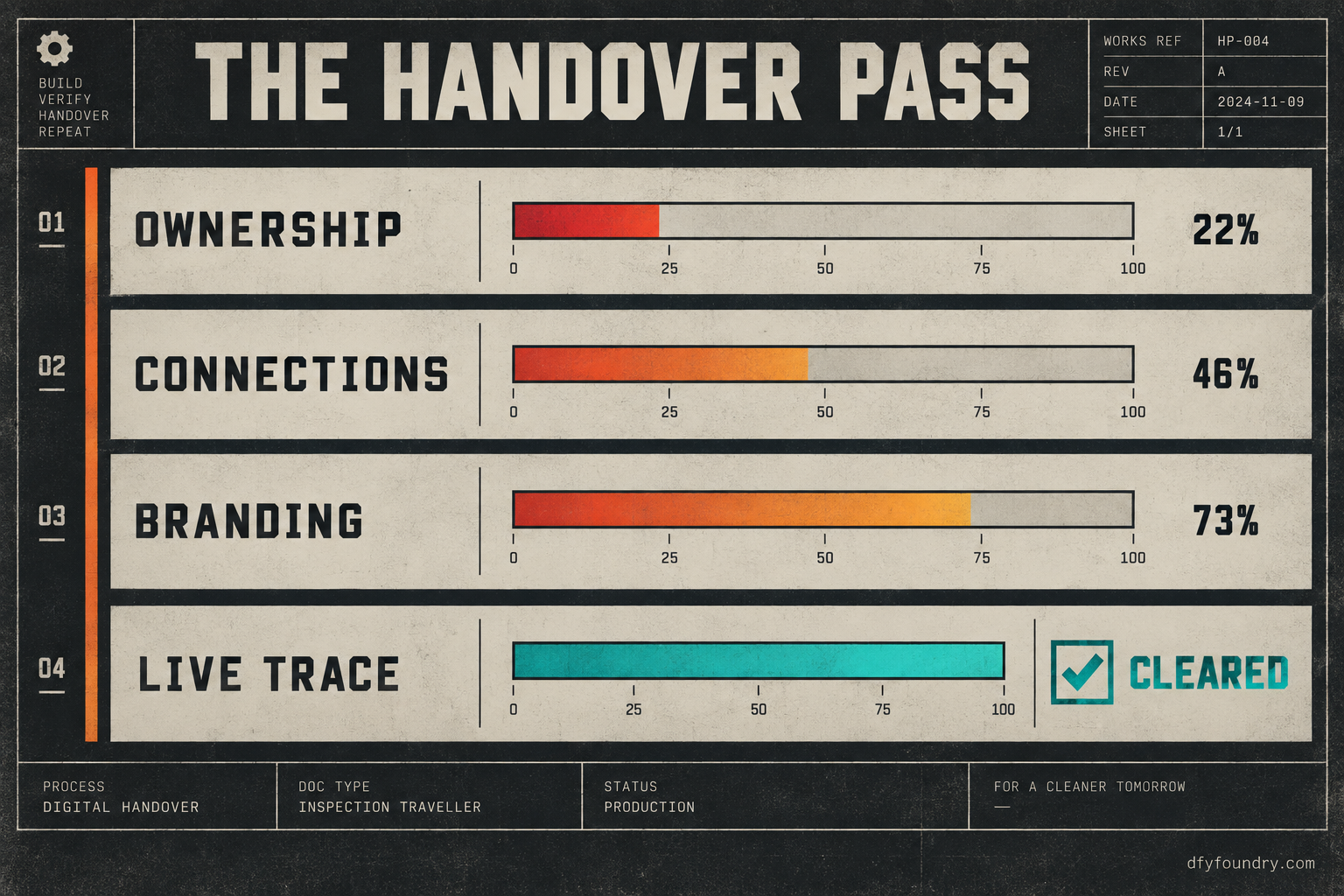
The useful way to think about a GoHighLevel sub-account is in layers, and a handover walks them from the bottom up. Underneath everything sits ownership: who the account belongs to, who holds admin, whose login the integrations were authorised under. Above that sit connections: the phone number, the A2P registration, the sending domain, the calendar links to a real Google or Outlook account. Above that sits content and branding: the business name, the logo, the sender names, the links and offers held in custom values that every message reads from. On top, where the smoke test lives, sits behaviour: the triggers, the workflows, the actual firing.
A smoke test only ever checks the top layer. A handover checks all four, in order, because a fault in a lower layer hides under a working top layer. The calendar that books to you is an ownership fault wearing a working booking. The confirmation signed by the last client is a branding fault wearing a delivered message. The account looks live from the top and is wrong underneath, and the client is the one who falls through it.
So the pass runs bottom to top. Start in Settings, in the account you are handing over, logged in as yourself, and work the layers.
Ownership. Open the staff and user list and read who has access. A build account almost always carries your login as admin, and often a second seat you added to test with. Decide what the client gets, add their user, set the role, and plan to step your own access down to what your fulfilment relationship actually needs rather than leaving a full admin seat you forgot about. Check the account owner on the location itself. Check which login authorised any integration, because an integration authorised under your personal Google or your agency token is a connection the client does not actually hold.
Connections. Walk the phone number, the A2P brand and campaign, and the sending domain. These are the links a build never carries and a fresh account never has, and they are where a handover most often dies silently. The full trace from workflow to carrier, and the five places a message dies on the way, has its own breakdown, so run that one as the deep version of this step. The short version: a number provisioned inside this sub-account, a brand and campaign filed for this client, a domain authenticated with its DNS records published, and not one of them pointing at anything of yours.
Branding. Open the custom values and read every one. The business name, the sender name, the booking link, the address, the offer, the reply-to. These are what every text and email interpolates, and a build carries the slots while the values arrive holding whatever you last typed into them, which on a reused build is the previous client’s details. Why those values go blank or stale is worth reading if you build from a master. Then walk the website and funnels for a logo, a colour, a phone number or a footer that still belongs to the template.
Behaviour. Only now run the lead. Push a real contact through the real form, watch the workflow enrol it, book a live slot, and then go read what actually happened from the client’s side, not yours.
The faults a working account hides
The symptoms of a bad handover are quiet. The account runs. What is wrong sits under the run, in one of these.
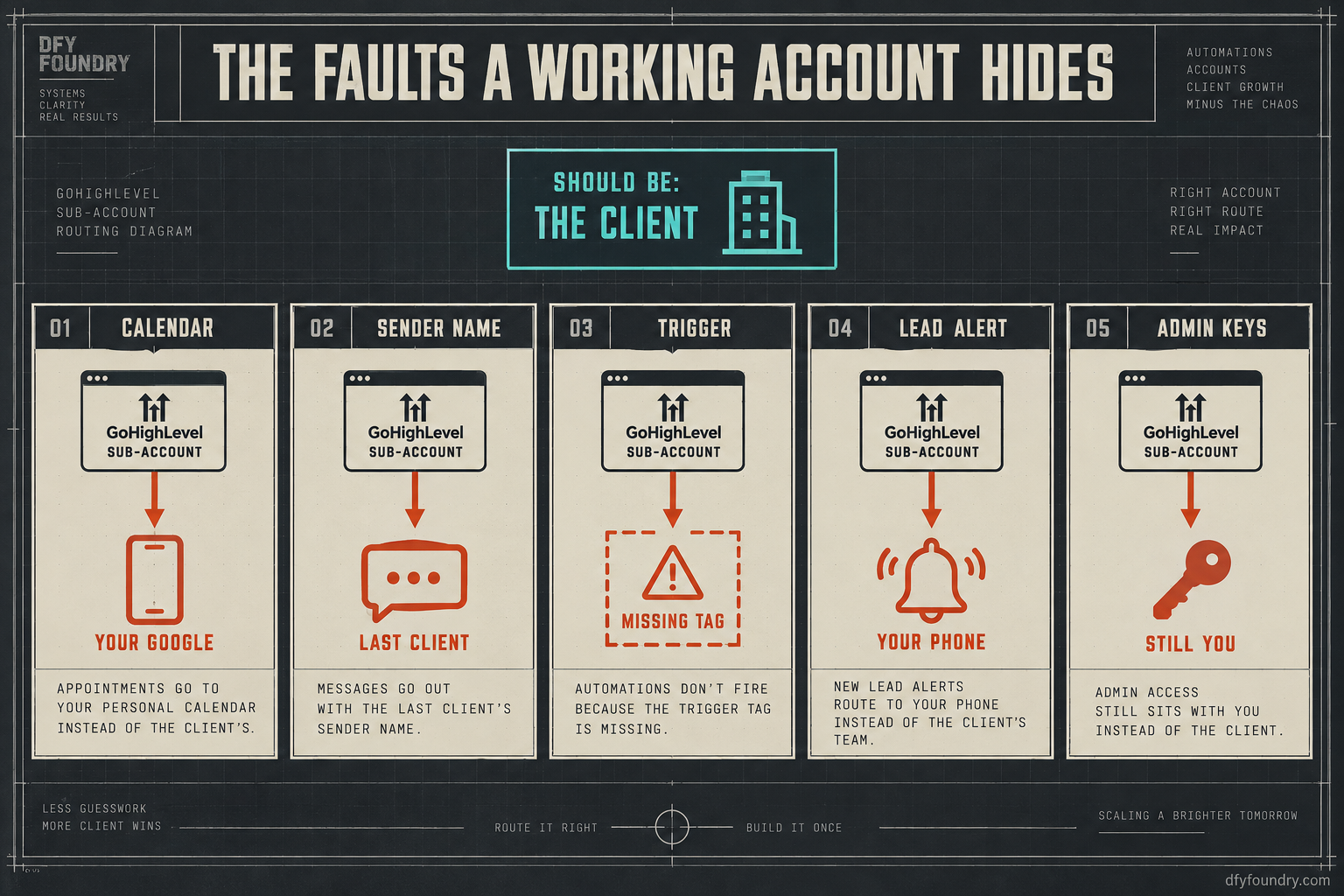
The calendar books into your own account
What you see. Bookings work. A lead picks a slot, gets a confirmation, lands on a calendar. The client says they never see any of it.
What is wrong. A GoHighLevel calendar needs a connected Google or Outlook account to write events into and to read availability from. If you built on your own Google login, which is the natural thing to do while testing, every booking writes to your personal calendar and checks your availability, not the client’s. The booking genuinely happens. It just happens in your life instead of theirs, and the client is blind to their own pipeline.
The fix. In the calendar settings, disconnect your account and connect the client’s Google or Outlook under their login. Re-check the calendar team and the assigned user so availability reads from the right person. Then book a live test slot and confirm the event appears on the client’s calendar, not yours, and that the notification reaches them.
The account still speaks as the last client
What you see. Messages send, and they send clean, and they go out signed by a business that is not this one. Or the website footer still carries another trade’s phone number.
What is wrong. When you build from a master account or reuse a prior build, the branding lives in custom values and in page content, and both carry forward. The workflows are right. The copy is right. The name inside the copy belongs to whoever you built it for last. A text that opens with the wrong business name does more damage than one that fails to send, because it sends with confidence and tells the lead this agency is sloppy.
The fix. Read every custom value out loud against this client’s real details and correct each one. Walk the funnel pages and the email templates for a hardcoded name, logo or number. Set the sender name and the reply-to for this client. Then send yourself the first message in every sequence and read the words that arrive, not the words in the builder.
A trigger points at something that no longer exists
What you see. A workflow is published, looks complete, and simply never enrols anyone. No error. No contacts moving.
What is wrong. Triggers bind to objects by their identity: a specific tag, a pipeline stage, a form, a calendar. When a build is assembled, renamed or part-rebuilt, a trigger can end up pointing at a tag that was never created in this account or a stage that got renamed, so the condition can never match and the workflow waits forever for an enrolment that cannot arrive. This is different from a workflow sitting in draft, which does not run at all. This one runs, and catches nothing.
The fix. Open each workflow that matters and check the trigger against the objects actually present in this account. Confirm the tag exists, the pipeline stage exists under that exact name, the referenced form is this account’s form. Fix the binding, then fire the real trigger with a live contact and watch the enrolment happen rather than trusting the published badge.
The lead alerts ring your phone, not theirs
What you see. Leads come in, land in the pipeline, get worked by the automations exactly as built. The client complains they never get told a lead has arrived and keep finding out hours late.
What is wrong. Internal notifications are a separate wire from the customer-facing messages, and they are easy to leave pointed at yourself. The internal-notification step inside a workflow, the task assignment, the account notification email and the mobile alerts all have a recipient, and on a build account that recipient is you, because you were the one watching it come together. The outbound side works, so the lead gets their confirmation. The inbound alert that tells the business to call the lead back fast goes to the builder, and the client sits blind while the follow-up window closes.
The fix. Walk every workflow step that notifies a user and re-point it at the client’s user. Set the account notification settings and the assigned user for new contacts to the client. Then push a test lead and confirm the alert reaches the client’s phone and inbox, not yours, because speed of first contact is the whole point of the build and it dies if the alert never lands.
You still hold the keys
What you see. Everything works, and it works because you are still the admin, still the authorised login, still the owner of the number.
What is wrong. A handover that leaves you as sole admin, with the integrations under your token and the number in your agency rather than assigned to the sub-account, is not a handover. It is you running the account with the client watching. The day you offboard the client, or the day your token refreshes, things the client depends on quietly stop, and they have no access to see why. Leftover ownership is a fault that does not bite on handover day. It bites on the day you part ways.
The fix. Give the client a proper user at the right role. Re-authorise any integration that was connected under your personal login so it runs on a connection the client holds. Confirm the number is assigned to this sub-account. Decide deliberately what access you keep for fulfilment, and make it a choice rather than a thing you forgot to remove.
What a dropped handover actually costs
The reason this is worth half an hour is not tidiness. It is a meter running and a reputation on the line, and the arithmetic is worth doing with your own figures rather than mine.
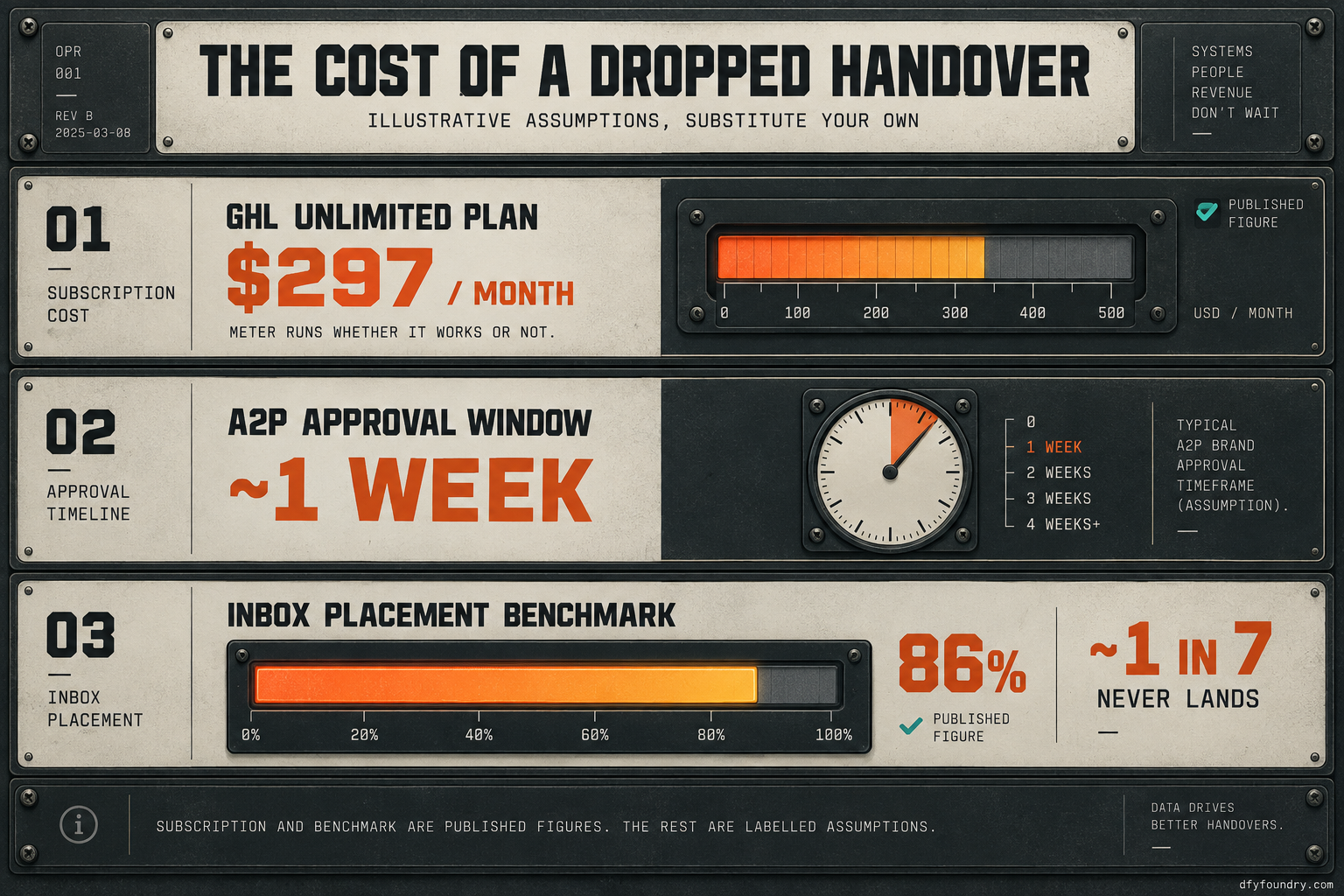
Start with the meter. A HighLevel Unlimited plan runs $297 a month on the prices published in 2026 (GoHighLevel), and that charge runs from the day the account exists, whether the client is getting value from it or getting silence. An account that technically works but books into your calendar and signs as the wrong business is a subscription you are both paying for, delivering nothing the client can see.
Then the sending side, which is real money with a real source. Industry inbox-placement benchmarks sit around 86 percent, with Gmail higher and Microsoft lower (Validity 2026 Email Deliverability Benchmark Report), which means roughly one in seven legitimate messages never reaches the inbox even when everything is configured right. Hand over an account with the domain unauthenticated and you are starting below that line, not at it. On the SMS side the registration is passthrough and modest: filing a brand with The Campaign Registry costs a few dollars, a campaign a little more, and a monthly campaign fee that runs from around a dollar and a half up to thirty depending on use case (HighLevel). Small to pay, slow to clear, and a week of approval (Twilio) if you only start it after the client signs.
Now the redo, which has no clean published number, so treat the next figures as labelled assumptions you should replace with your own. Say a botched handover costs you a working day to unpick on a live account, because you cannot take it down while leads are coming in. Put your own blended rate on that day. Add the bookings that leaked while the calendar was pointing at you: assume a modest inbound flow and that fast follow-up wins roughly a third of leads when it reaches the client and far fewer when it does not, and the appointment reminders and no-show recovery a build ships are tuned toward a 70 percent no-show recovery target rather than any measured result. None of that recovery is worth anything while the booking is landing in your personal calendar. The pass that would have caught it ran under half an hour. The method matters more than my numbers: put your rate, your lead count and your close rate in, and the gap tells you plainly how much a skipped check is worth.
The objections, answered straight
“I test every build before it ships, so this is covered.” You test that it works. This checks that it works for them. Those are different passes and the second is the one that slips, because a functional test runs from your own seat, on your own logins, where the calendar on your Google and the integration on your token both behave perfectly. The only way to catch an ownership fault is to stop testing as the builder and start checking as the client: log in as them, book as a lead, read as the recipient.
“This is overkill for a small client.” The small client is exactly where the corner gets cut, and exactly where a wrong sender name or a booking lost to your calendar does the most damage, because a small client notices a single missed lead. The pass does not get longer for a small account. It gets faster, because there is less to walk. There is no account small enough that the client should be the one who finds the calendar books to you.
“Why pay you for a build when I would still have to QA it?” You should run the live trace on any account, ours included, and we would rather you did. The honest answer is that what you buy is the layers underneath already set and already traced: the number provisioned, the registration filed, the domain authenticated, the branding keyed to this client, the ownership put in the client’s hands, and a live lead pushed end to end before it reaches you. A build off our floor is handed over clean because the pass is our job, not yours. The last check still belongs to you, and it should. If that trade is worth it, a snapshot installation or a full white-label agency setup is where it starts, and the pricing page has the numbers.
Before you send the login
The account that works and belongs to the wrong person is not a rare bug. It is the default state of anything you built on your own bench, because the connections, the branding and the access all point at you until you deliberately re-point them. The build was always going to carry structure and never going to carry ownership.
So make the last step of your process the handover pass, not the smoke test. Walk ownership, connections, branding and behaviour, bottom to top, logged in as yourself and then as the client. Push one real lead the whole way through and read what the client would read. If anything of yours is still wired in, you find it on a test lead instead of their first real one. That is the entire difference between a handover that holds and a client who calls you on Tuesday. If you would rather the account arrive already set in the client’s hands and traced, that is what a dental clinic snapshot or an HVAC company snapshot ships as, and either way the rule is the same. Never send a login to an account you have not used as the client first.
Questions on this
It is the moment a sub-account stops being yours and becomes the client's, with their calendar, their number, their branding and their admin access, and your name scrubbed off it. A handover is not a test that the account works. It is a check that it works from the client's seat, on their own connections, with nothing of yours left wired into it.
Because a calendar in GoHighLevel is a connection, and a connection does not travel in a snapshot or survive a build the way the funnels and workflows do. If you built on your own Google account and never re-pointed the calendar at the client's, every booking lands in your personal calendar. Re-connect the calendar to the client's account and book a live test slot before handover.
On an account you built properly, the full pass runs under half an hour: a walk through ownership, connections, branding and a single live lead pushed end to end. The redo when you skip it is not half an hour. It is a day of unpicking a live account while a client watches, plus the trust you do not get back once they have found the fault first.
Yes. Brand and campaign registration is tied to the sending business and the number, not to the build, so each US sub-account files its own through The Campaign Registry. Fees are passthrough and run from a few dollars to register a brand up to a monthly campaign fee, depending on use case. The send path has its own full trace if you need it.
You should, on any build, ours included. Log in from the client's seat rather than yours, confirm the calendar books to their account, send a live lead through the real form, read the message that arrives for the client's branding, and check who holds admin. A build that leaves our floor is traced that way before it reaches you, but the last check is always yours to run.