ST-04 · QUENCH
Why GoHighLevel Skips Some Contacts and Floods Others
A GoHighLevel workflow runs but one contact never gets the text and another gets it four times. Why the contact layer skips some and floods others, and the fix for each.
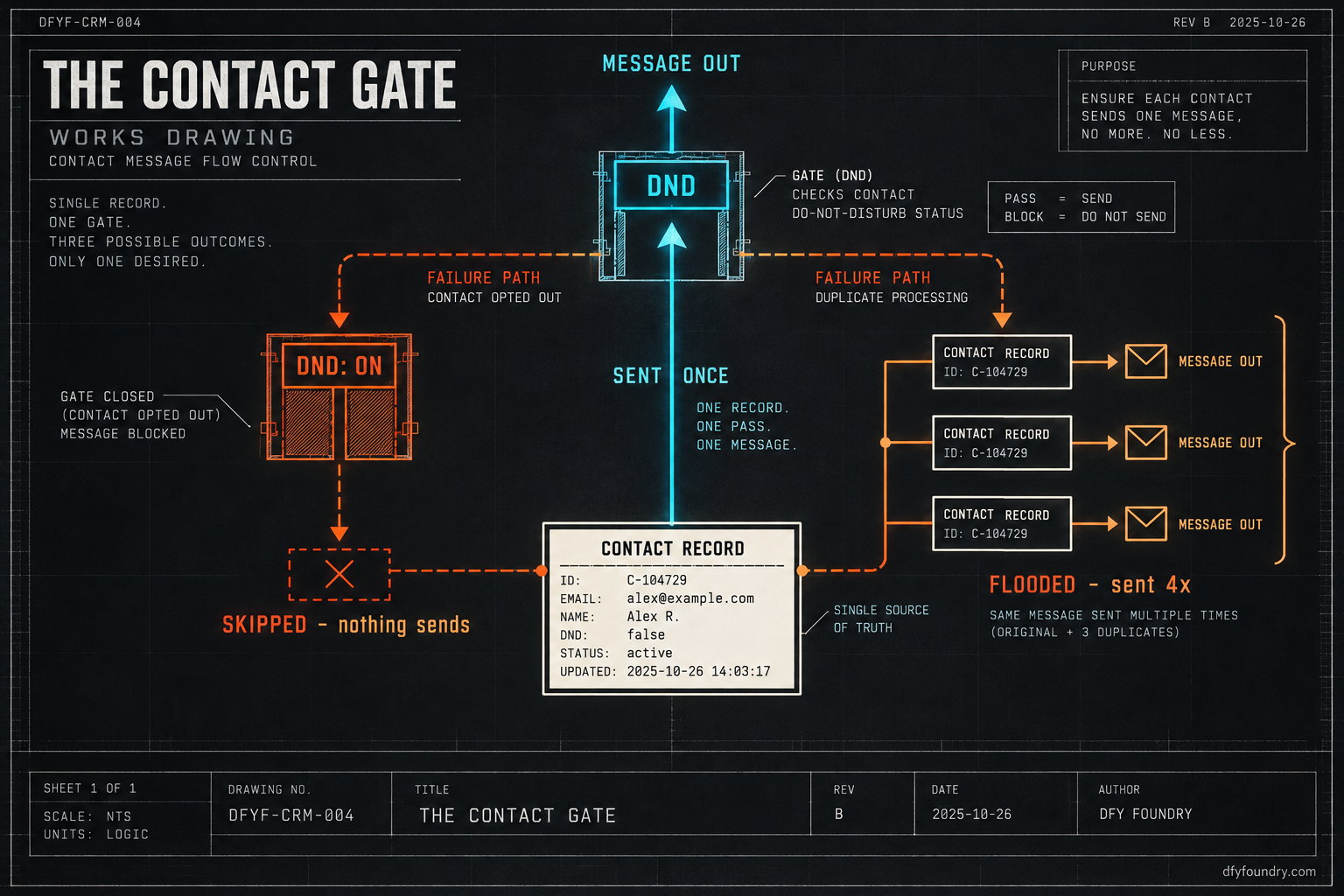
Two emails sit in your inbox before nine. The first is from a dental client. One of their patients got the same appointment reminder four times on Monday evening, the last one at 9:12pm, and replied with a word you would not put on a billboard. The second is from a roofing client who closed a two thousand dollar job last week and swears the lead never got a single text from the new system. Not the booking confirmation, not the reminder, nothing. They chased it by hand and nearly lost it.
Same week. Same snapshot. Opposite failures. One account is sending too much to one person and nothing at all to another, and both clients have decided the build is broken.
It is not broken. The workflows are firing exactly as they were drawn. Neither complaint lives in a workflow. Both live one layer down, in the contact record, where GoHighLevel quietly decides who is allowed to be messaged and how many copies of that person exist. That layer never shows up on the workflow canvas, which is why it is the last place anyone looks and the first place a hand-over fails.
How GoHighLevel decides who gets messaged
Before a workflow sends anything, two questions get answered about the contact. Both are answered off the canvas, where you cannot see them while you stare at green steps.
Question one: is this contact allowed to be messaged
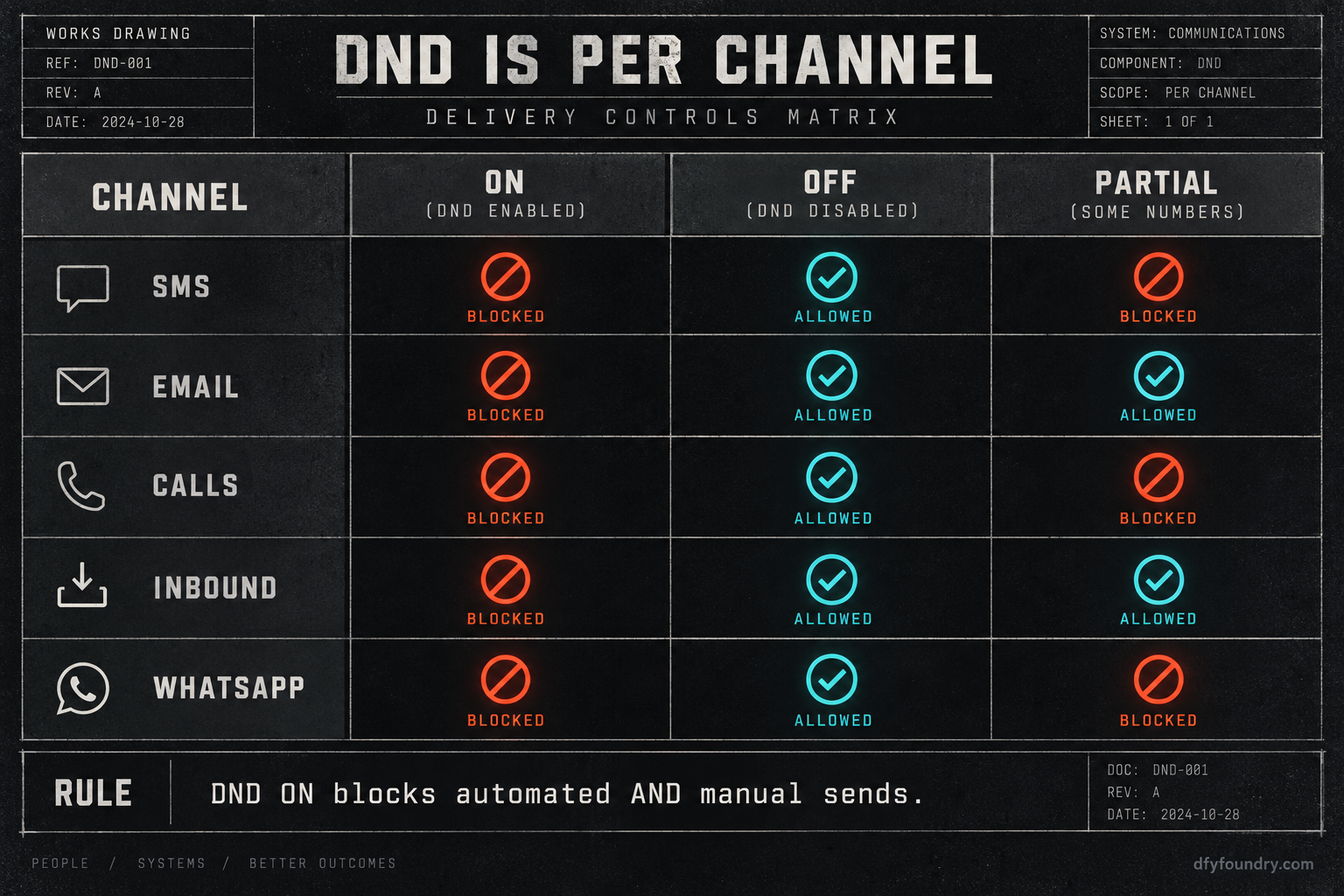
Every contact record carries a Do Not Disturb flag, DND for short. It is not one switch. It is a flag per channel, and the channels are kept separate: SMS, Email, Calls and voicemails, inbound Calls and SMS, Google My Business, Facebook Messenger and WhatsApp, each set on its own. HighLevel’s own Do Not Disturb article lists them. Each channel sits in one of three states. Off means messages go out. On means they are blocked. Partial means some channels are open and others are shut on the same record.
Here is the part that catches people. DND on blocks automated and manual sends both. It did not always work that way. The older behaviour let a human still fire a message by hand from the conversation view while DND was on, so a rep could override it. That gap was closed, and now a rep who opens the thread and types a message watches it fail the same silent way the workflow did (Growthable’s writeup walks the three states). When DND is on for SMS, no workflow text and no hand-typed text leaves. The contact is on the canvas, enrolled, ticking through every step, and each send step does nothing and reports nothing.
Question two: how many of this contact exist
The second question is how many records GoHighLevel thinks this person is. The answer depends entirely on which door the contact walked through.
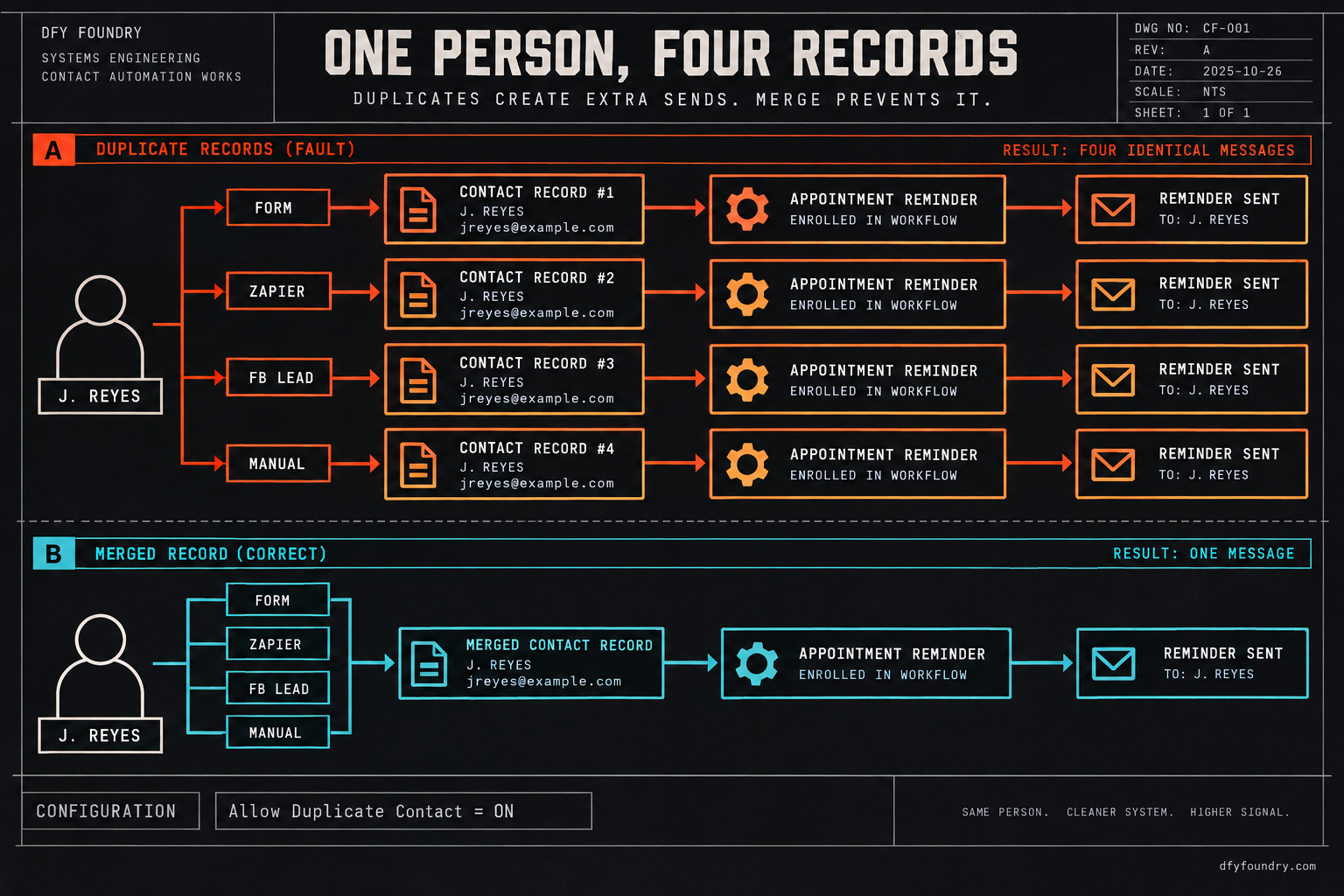
A CSV import always merges. Upload a spreadsheet and the system matches on phone or email and folds a match into the record that is already there, no matter what your settings say, so a CSV cannot create a duplicate. HighLevel’s deduplication article is explicit about it. Every other door behaves differently. Form submissions, Zapier, and Facebook or Instagram lead ads are governed by one setting named Allow Duplicate Contact. When that setting is on, a new lead whose email or phone already exists gets a brand new record anyway. When it is off, the match updates the existing record instead.
So the same person can land as one record or as four, depending on how they arrived and how that one setting was left. And this is where the two questions tie together. A workflow enrols records, not people. If a person exists as four records and all four get caught by the appointment reminder trigger, the reminder fires four times, once per record, each copy certain it is the only one.
That is the whole machine. A flag decides whether a record may be messaged, and a dedupe setting decides how many records a person is. A snapshot carries structure, not state: the workflows, the funnels and the message copy travel inside the file, but the DND flags, the contacts and the dedupe preference are account state that has to be set for each sub-account by hand. When an account messages the wrong amount, it is nearly always one of these two, and they pull in opposite directions.
Where the contact layer actually fails
One: the contact is silently on DND
What you see. When a GoHighLevel contact is not receiving messages though the workflow shows them enrolled and completed, and other contacts in the same workflow get theirs fine, you are looking at this. One record, dark.
What is wrong. That record has DND on for the channel the step uses, and three things you did not do on purpose can set it. The lead replied STOP at some point and the system flipped SMS DND to on. A bulk action in an old workflow or a list operation switched it. Or the record arrived from a source that carried a DND value in. Nothing on the canvas shows any of it. You have to open the contact.
The fix. Open the record, read the DND panel channel by channel, and clear the channel you need. If it is a real opt-out, leave it: a contact who texted STOP is off limits by law, not by preference, and sending around that is its own kind of trouble. The job is to know which it is instead of guessing the build failed.
Two: the STOP reply shut one channel, not all of them
What you see. The contact gets emails but never texts, or the reverse. Half the sequence lands and the other half vanishes.
What is wrong. DND is Partial. A STOP reply usually flips SMS DND to on and leaves Email open, so the email steps keep sending while the SMS steps go nowhere. For a reminder that was built to go by text, Partial DND is the quietest failure there is. The channel the appointment depends on is the one that is shut, and the open email channel makes the whole account look like it works.
The fix. Check the channel the critical step actually uses, not whether any channel is open. A build that leans on SMS for no-show recovery has to verify the SMS channel specifically, on a live record, before the account changes hands.
Three: duplicate records, each one enrolled
What you see. One person gets the same message two, three or four times, often inside the same minute.
What is wrong. That person exists as more than one record and each record is enrolled. It happens when Allow Duplicate Contact is on and the lead came through a form, through Zapier, or through a lead ad more than once, or through more than one of those doors at different times. Each arrival minted a new record, and the reminder trigger caught every one. The workflow is behaving perfectly. It is just running four times.
The fix. Merge the records. Select them, choose a master record, and merge, picking which value wins where fields conflict. Then set the dedupe preference on purpose: off for most agency sub-accounts, so a returning lead updates one record rather than spawning a second. A clean-up without that setting change is a chore you will repeat next month.
Four: a re-saved trigger re-enrolled the whole list
What you see. A large batch of contacts all get a message at once, often at an hour nobody scheduled, like the 4am send that started a lot of these panics.
What is wrong. A workflow trigger was edited and re-saved in a way that re-evaluated the entire contact base, and every contact matching the trigger condition got enrolled again. If the workflow had no entry limit, or its re-entry setting allowed it, contacts that already finished ran through a second time. The odd hour is usually a timezone gap between the account setting and the contact’s own timezone field, so a window meant for the afternoon lands in the middle of the night.
The fix. Before you re-save a live trigger, check the re-entry setting and whether your change will re-match contacts who are already done. Set the account timezone and confirm the contact-level timezones, so a send window of nine to five does not fire at four in the morning for half the list.
Five: an imported workflow carries a DND action
What you see. Contacts go quiet after they reach a certain point, and stay quiet across every later workflow, not just the one they were in.
What is wrong. The snapshot you imported has a DND Contact action sitting inside a workflow, set to turn DND on, often as the leftover of an old opt-out branch the seller built for a different account. Every contact that reaches it gets flagged, and the flag sticks to the record, so it suppresses every future send from every workflow after that. The structure that does this travelled in the file. The damage only appears once live contacts start flowing through it, which is to say after the client is already using the account.
The fix. Search the imported workflows for DND actions before a single live contact runs through them, and confirm each one is doing what you want. This is exactly what an install QA pass is for: reading what the file actually does, not trusting that it does what the demo did.
Six: the record has no number to send to
What you see. A whole batch of contacts never gets a text, the workflow shows them enrolled, and the DND panel is clean. So it is not DND, and it is not duplicates, and you are stuck.
What is wrong. Those records have no phone value, or a malformed one, in the standard phone field. The SMS step has nothing to dial, so it skips without an error. It happens two ways on a fresh account. A form went live without a required phone field, so leads came in with an email and no number. Or a contact import mapped the phone column to a custom field instead of the Phone field, so the data is on the record but not where the SMS step reads from. The second one is cousin to the blank merge-field problem: the value exists, it is just not in the slot the system uses.
The fix. Pull a smart list filtered to contacts with an empty phone value and see how large it is before you hand over. Fix the form so phone is required where the build sends by text, and re-check the field mapping on any import so the number lands in the Phone field, not beside it. A record that cannot be dialled is as silent as one on DND, and it hides better.
The numbers on sending too much and too little
The build installs into a HighLevel account, and that account is not free. Unlimited, the tier most agencies run so each client sits in its own sub-account, is 297 dollars a month (confirmed against HighLevel’s plans via search snippet this run, not independently fetched). Every message on top of that is metered. So both failures cost real money, in opposite directions, and you can size each with figures you can swap for your own.
Take the over-send first. Assume a client with 400 active leads a month, and assume 6 percent of them arrive as duplicates because a form and a lead ad both run with Allow Duplicate on. That is 24 people living as two records each. If the reminder for a booked appointment fires four times, each of those duplicated people gets hit eight times instead of four. The extra traffic is not the expensive part. The complaint rate is. Gmail and Yahoo hold bulk senders to a spam complaint rate under 0.3 percent, and cross that line and inbox placement drops for the whole sending domain, not just the annoyed contact (the bulk sender requirements spell out the 0.3 percent ceiling). It takes very few people marking a quadruple reminder as spam to push a small sub-account past that line, and once a domain’s reputation dents it is slow to come back and it drags every client who sends from it.
Now the under-send. The product target on a no-show build is to recover up to 70 percent of no-shows, and the engine of that target is the reminder reaching the patient. Assume 120 booked appointments a month and a 20 percent no-show rate, so 24 people do not show. If the reminder is tuned to recover 70 percent of them, that is about 17 saved. Now assume 5 percent of the booked list is silently on SMS DND, the channel the reminder rides. Five percent of that list is six people whose reminders never send, and they skew toward the repeat patients who replied STOP to an old blast and went invisible. The recovery math only holds if the reminder lands on the handset. A 5 percent silent-DND rate quietly saws the top off the number the whole build was sold on.
Neither figure is a measured result. They are a worked example with every input printed, so drop your own lead count, duplicate rate and DND rate in and the arithmetic still runs. The direction is the point. Over-sending costs you the domain’s reputation. Under-sending costs you the outcome the client is paying for. Both stay invisible until somebody counts.
The objections, answered straight
“This is a one-time clean-up. I will merge the duplicates and move on.” You can, and you should, but the merge fixes today’s records, not tomorrow’s. If the dedupe setting stays on and the lead sources keep minting new records, the list is flooded again by next month. The durable fix is the setting and the merge together, not the merge alone. A clean-up with no policy behind it is a task you keep redoing.
“I can manage DND and dedupe myself. They are free toggles.” True, all of it costs nothing but attention, and if you run enough sub-accounts to have a routine for reading the contact layer, run it. The failure is never the toggling, it is the not-knowing: an account handed over with a buried DND action, or Allow Duplicate left on, looks perfect on the demo and breaks in the first real month of volume. If you already run a pre-hand-over pass that reads the imported workflows and sets the contact policy, you do not need us for this one.
“My workflows are clean, so the build is clean.” The workflows can be flawless and the account can still message the wrong amount, because the contact layer is not in the workflow. This is the uncomfortable one. A green canvas is not a working account. The only proof is a live contact pushed through, watched to a handset that is not yours, on the channel the critical step uses, with the record’s DND panel open while you watch.
“Why pay you when the fix is a setting I can read off a help doc.” Fair, and the help docs are linked above for free. What a commissioned build buys is that the account leaves the floor with the contact policy already set, the imported workflows already read for stray DND actions, the dedupe preference chosen for an agency sub-account, and one live lead pushed through to confirm a single person gets a single message on the right channel. Delivery is within 24 business hours of purchase confirmation, business hours being nine to five Central, Monday to Friday, so an order placed Friday afternoon lands Monday. Installation is free with every snapshot, and it comes with 15 hours of dedicated installation support to spend within eight days of purchase, covering the install, the website rebrand, A2P and 10DLC registration, email domain setup and a few extra automations where the build needs them. If your hours are worth more than the price of an HVAC build, the finished account is the cheaper trade. If they are not, the checklist above is yours to run, and the pricing page has the numbers either way.
Before the next hand-over
Change the last thing you do before a client logs in. Stop treating a green workflow as a finished account. Open a real contact record and read its DND panel channel by channel. Confirm the person exists once and not four times. Set the dedupe preference on purpose. Search the imported workflows for DND actions. Then push one live lead through and watch one message reach one handset on the channel that matters. Over-sending and under-sending are the same oversight seen from two ends, and both are caught in the one place nobody on the workflow canvas is looking.
Questions on this
Almost always the Do Not Disturb flag. DND is set per contact and per channel, so a record can be enrolled in a workflow, tick through every step, and still send nothing because DND is on for the channel that step uses. Open the contact and read the DND panel channel by channel before assuming the build is broken.
Because that person exists as more than one contact record and each record is enrolled in the workflow. A workflow enrols records, not people, so three records of the same person fire three copies. It happens when Allow Duplicate Contact is on and the lead arrived through a form, Zapier or a lead ad more than once.
No. A CSV import always merges on phone or email regardless of your settings, so a spreadsheet cannot mint a duplicate. The duplicates come from forms, Zapier and Facebook or Instagram lead ads, which are governed by the Allow Duplicate Contact setting. Leave that setting off for most agency sub-accounts.
No. A snapshot carries structure, not state. The workflows, funnels and message copy travel in the file. The contacts, the DND flags and the deduplication preference are account state that has to be set for each sub-account. An imported workflow can still carry a DND action inside it, which is its own problem.