ST-05 · TEMPER
A GoHighLevel Agency's Q4-Into-Q1 Operating Calendar
A dated Q4-into-Q1 calendar for a GoHighLevel agency: what seasonal automation to charge up before the rush, when to freeze changes, and what to switch off in January.
It is the last week of September. A gym-and-studio client’s account has run clean all summer, so you open the message log to check a booking and last December comes back to you instead. On the 22nd you fired a holiday gift-card offer to the client’s whole list, a list the account had not emailed since August, and Gmail dropped a good part of it into spam because the domain had gone cold. On the 23rd you tried to fix a workflow on the fly and knocked out the booking confirmation for a full day. On the 8th of January a “Merry Christmas from the team” text went out to the client’s list because a seasonal workflow was never switched off, and the client called, not amused.
None of that was a broken account. The account was built well and behaved exactly as it was told. What was missing was a plan for the year’s grain, set early enough to act on. A build takes heat at known times, the same way stock does on a floor, and the times are on the calendar months ahead. You do not schedule a pour for the moment the metal is already glowing. So before the leaves turn, it is worth laying the whole quarter out: what to charge up now, when to strike, when to hold still, and what to let cool in January.
A year has a grain, and an account should run with it
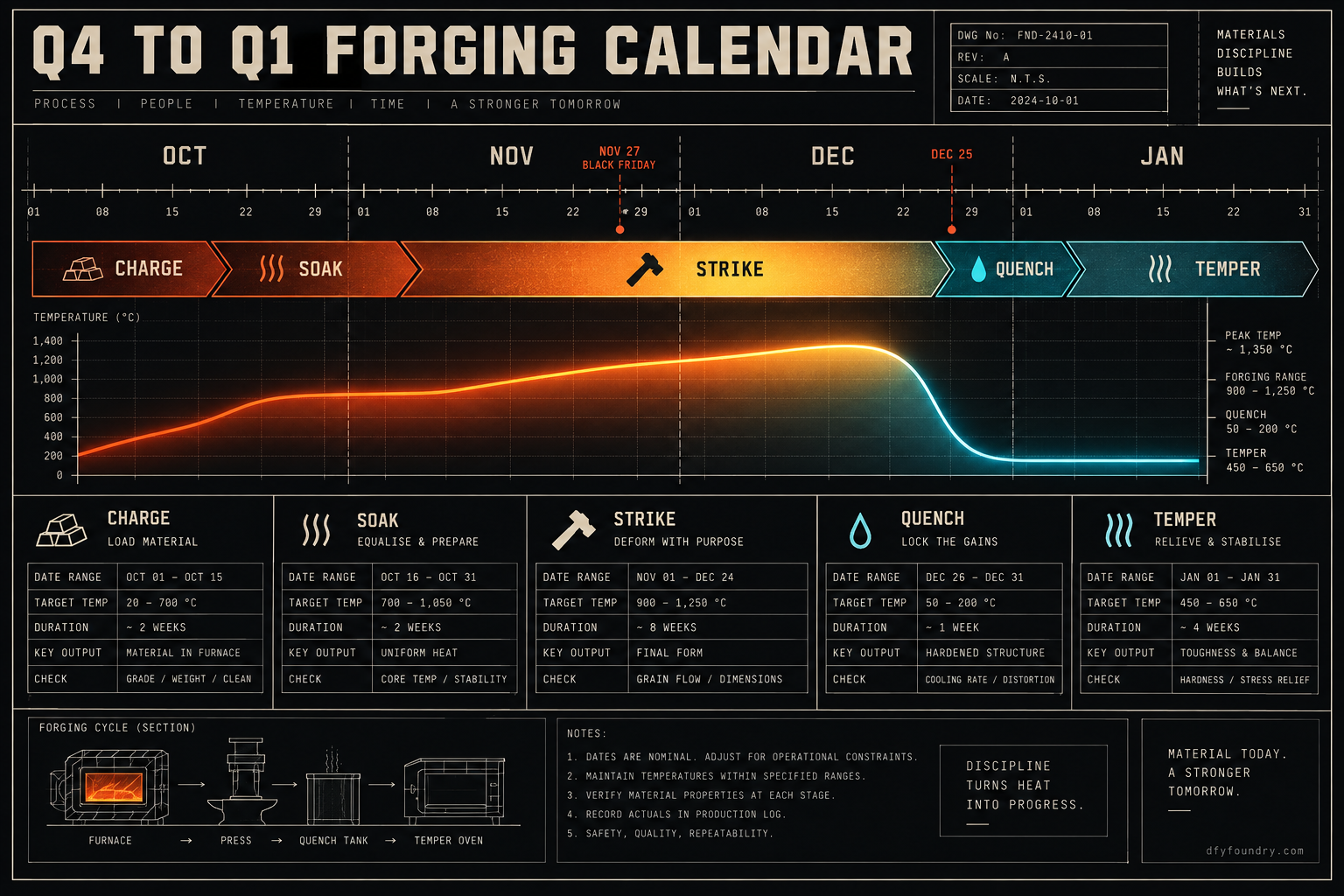
Treat the client’s account as a piece of stock and the year as the thing applying heat. Demand is not flat. It rises around a handful of dates the client already knows, and the job is to have the automation in place and the send path clear before those dates arrive, not while they are passing. That is the whole logic of the forging line applied to a quarter. You charge the piece, soak it so it takes heat evenly, strike while it is hot, quench at the year end, and temper it back to a working state in January.
Underneath the tidy language sits real GoHighLevel mechanism, and it is worth naming the screens. A seasonal campaign runs off a trigger, and the cleanest one for this is the Custom Date trigger, which fires a workflow on a date you set rather than on a lead action. Build the offer in October, point the workflow at Black Friday, and it goes out on its own while you are doing something else. HighLevel documents this exact pattern for pre-planning holiday promotions. The offer copy, the dates and the discount live in custom values, so a seasonal workflow you built last year can be re-armed by editing the values rather than rebuilding the logic.
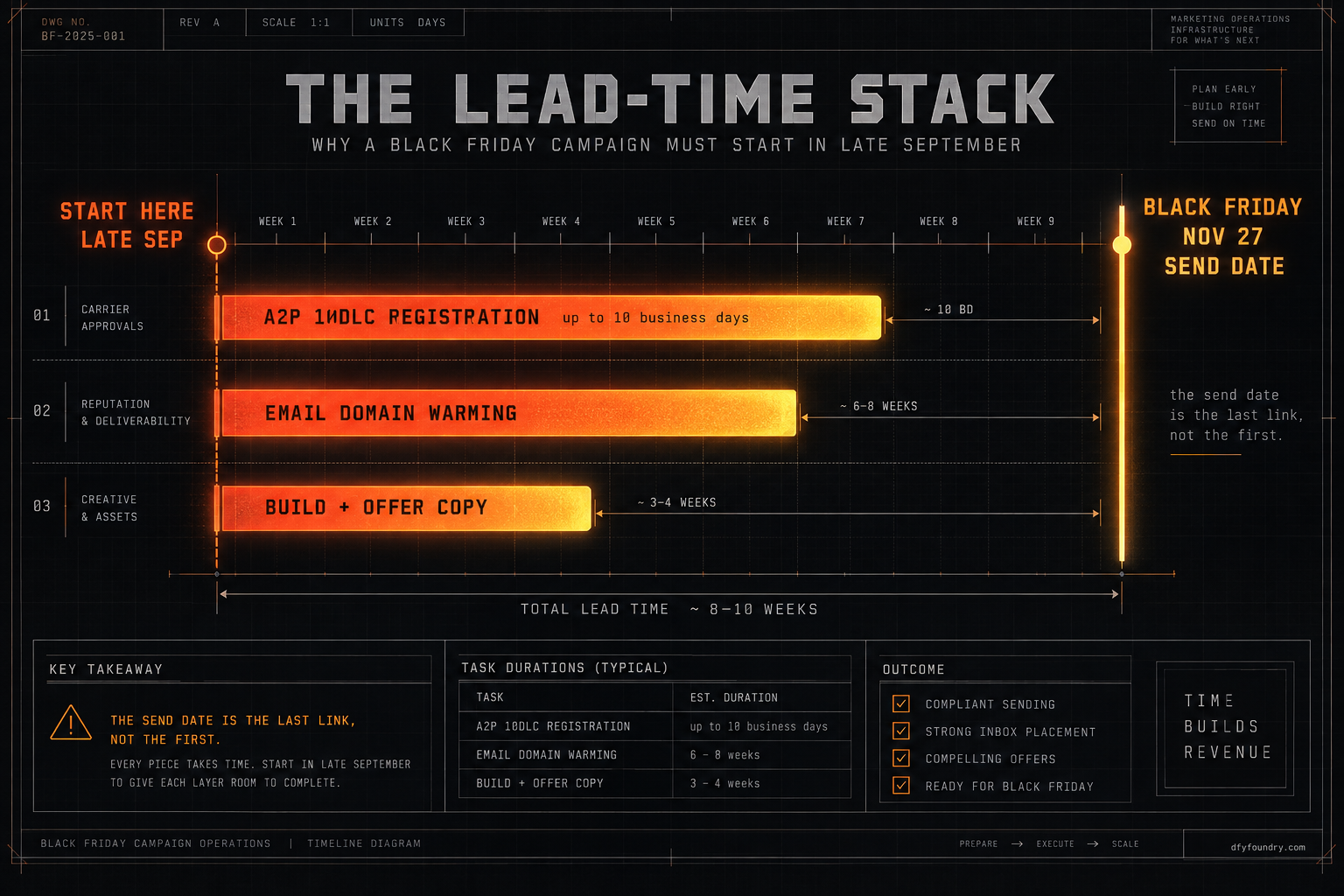
Here is the part that catches people. The workflow is the fast bit. The send path underneath it runs on timelines that do not care about your calendar. A text does not leave GoHighLevel unless the sending number sits under a registered A2P 10DLC brand and campaign, and carriers now block unregistered application-to-person traffic from ten-digit numbers outright, with campaign vetting through The Campaign Registry running up to ten business days (CallHub). An email does not reach an inbox at holiday volume unless the sending domain is authenticated and warm. Google and Yahoo require SPF, DKIM and DMARC on any domain sending more than five thousand messages a day, plus one-click unsubscribe and a spam complaint rate under 0.3 percent, and they have enforced it since the start of 2024 (PowerDMARC).
So a seasonal campaign is not a button you press in December. It is a chain of lead times, and the send date is the last link in it, not the first. Registration takes its window. Domain warming takes its window. The build takes its window. Stack those windows backward from the date the client wants to be loud, and you land in late September. That is why this calendar starts now and not on the first cold morning.
The heats, by month
The quarter breaks into four moves. Two of them happen before a single holiday message goes out, and the one most people skip is the last.
Charge and soak, from the last week of September through October. This is the build-and-prepare window. Author the seasonal workflows and the holiday funnels now, off the Custom Date trigger, so nothing has to be written under pressure in December. Confirm A2P is registered for every sub-account that will send a text, and file it for any that is not, in October, so a rejected campaign still leaves room to refile before it matters. Authenticate or re-check the sending domain on every account. Then soak: warm any domain that has gone quiet over the summer by sending real, engaged mail through October at a volume that climbs rather than spikes, so the domain is trusted by the time the holiday send lands.
Strike, through November and December. The retail calendar is the loudest part of the quarter: Black Friday on the 27th of November, Small Business Saturday on the 28th, Cyber Monday on the 30th, then Christmas on the 25th of December. A local-service client is not a doorbuster retailer, so the play is a booking or gift-card offer timed to those dates, fired from the workflows you already built. This is also the window where the appointment reminders and no-show recovery a build ships earn their keep, because staff are short over the holidays and calendars are tight. Those reminders are tuned toward a 70 percent no-show recovery target, and the target is worth nothing if the sequence is not armed and running through the busiest weeks.
Freeze, from about the 18th of December into the New Year. Stop editing live workflows. A change freeze feels overcautious right up until the afternoon you break a booking confirmation on the one week it carries the most traffic. If something is wrong, note it and fix it in January. During the freeze you watch, you do not touch.
Quench and temper, through January. The 1st of January is the reset. Walk every seasonal workflow and switch it off or re-date it for next year, or it fires again and greets the client’s list a fortnight late. Then re-arm the quarter’s other engine: reactivation. The leads that went quiet over the holidays are Q1’s raw material, and a win-back run is how you work them. Scrub the bounces the December volume threw off, honour every opt-out, and clean the list so the domain enters the new year in good standing. This is also the easiest month of the year to ask for reviews, while a good holiday experience is fresh, and the review automation a build ships is tuned toward a range of five to ten reviews a month.
| Window | Line stage | Set up | Switch off |
|---|---|---|---|
| Late Sep to Oct | CHARGE and SOAK | Build seasonal workflows and funnels, register A2P, authenticate and warm the domain | Nothing yet |
| November | STRIKE | Black Friday, Small Business Saturday and Cyber Monday offers off the date trigger | Any summer promo still live |
| December | STRIKE then QUENCH | Christmas offer, reminders and no-show recovery running hard | Freeze all edits from about the 18th |
| January | TEMPER | Reactivation and win-back, review push, list hygiene | Every seasonal workflow, disarmed or re-dated |
Read the last column. The reset is not a nicety. A seasonal workflow that nobody disarmed is the single most common way this quarter embarrasses an agency in front of a client.
Where the quarter goes wrong
The failures are not exotic. They are the same handful every year, and every one of them traces back to something done too late or not switched off. Work them in the order they bite.
Registering the number the week you want to send
What you see. You build a Black Friday SMS blast, schedule it, and on the day nothing reaches a handset, or the platform holds the campaign as pending registration.
What is wrong. The sub-account’s number is not registered, or the brand is filed but the campaign is still in vetting. Carriers block unregistered application-to-person traffic, so the message never leaves the carrier, and vetting through The Campaign Registry can run up to ten business days (CallHub). Start the filing in the third week of November and the campaign clears sometime around Christmas, long after the day you needed it.
The fix. File the brand and campaign for every sending sub-account in October. Treat A2P as the thing that sets your earliest possible send date, not the install, and build the rest of the calendar behind it.
Blasting a holiday campaign from a cold domain
What you see. The email sends, the account shows it delivered, and open rates fall off a cliff because most of it landed in spam or the promotions tab.
What is wrong. The domain went quiet after summer and you asked it to carry a holiday-sized send with no warm-up. Cross the five thousand a day bulk threshold cold, without a recent history of engaged mail, and Gmail and Yahoo treat the surge as suspect (PowerDMARC). Worse, a reputation you dent in December is slow to recover, so the damage follows the client into Q1.
The fix. Warm the domain through October with real mail to engaged contacts at a rising volume, so by November the receiving servers already trust it. Authenticate first, warm second, blast third, and never in the other order.
Editing live workflows during the peak
What you see. A booking confirmation stops firing, or a reminder goes out with a broken link, in the busiest week of the client’s year.
What is wrong. Someone opened a live workflow mid-December to make a small change and left it in a state that breaks a send. A live automation carrying real traffic is the worst possible thing to edit on the fly, and December is exactly when the traffic is highest and the tolerance for a broken send is lowest.
The fix. Run a change freeze from about the 18th of December. Log anything that needs fixing and hold it for January. If a fix genuinely cannot wait, clone the workflow, change the copy, test it end to end on a contact that is not a real client, and swap it in only once it holds.
Leaving the seasonal workflows running into January
What you see. In the second week of January a client forwards you a screenshot of a holiday greeting that just went to their whole list, weeks after the holiday.
What is wrong. A workflow built on a date trigger does not know the season is over. Unless you disarm it, it sits there waiting to fire again, and a recurring seasonal automation fires every year on its date whether or not you meant it to. The build did its job. Nobody told it to stop.
The fix. Make the January reset a checklist item, not a memory. Walk every seasonal workflow, and for each one either switch it off or re-date it for next year on purpose. The reset is as much a part of the calendar as the strike.
One calendar bolted onto every trade
What you see. The gym client’s January reactivation push works, and the same timing falls flat for the roofing client and the med spa.
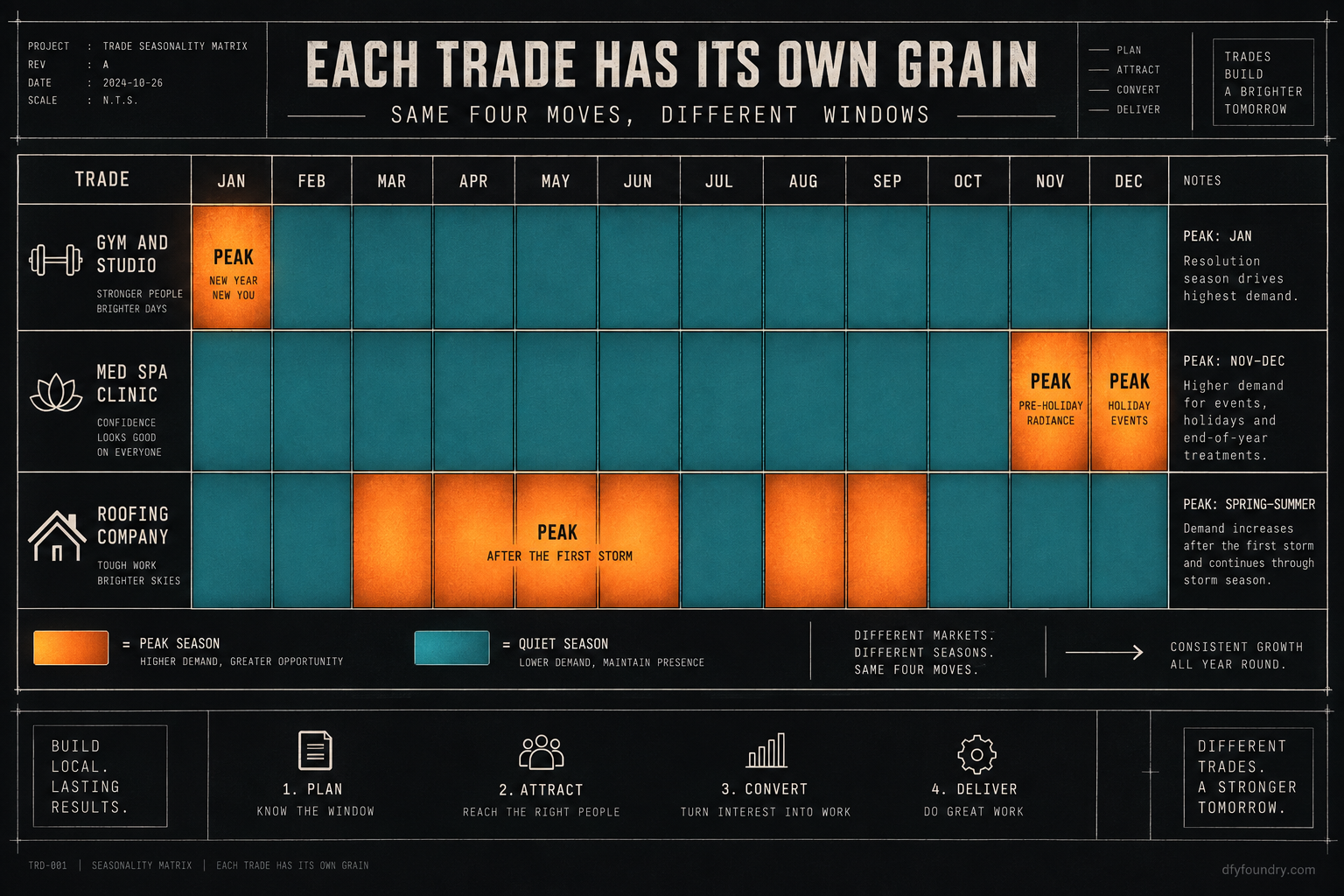
What is wrong. You ran one seasonal calendar across every sub-account without adjusting for the trade’s real grain. A gym peaks on New Year resolutions, so January is its strike window, not its reset. A med spa peaks on holiday gifting in late November and December. A roofer peaks after the first hard storm, which the calendar cannot even predict. Running the retail calendar over all of them wastes the sends and misses the weeks that matter.
The fix. Keep the four moves, charge, strike, freeze and reset, but slide the windows to each client’s own season. The framework is the same. The dates are the client’s, not the mall’s.
The numbers, with the assumptions on the table
The reason the reset and the freeze matter is money, and the arithmetic is worth doing with your own figures rather than mine.
Start with the meter that runs no matter what. A HighLevel Unlimited plan is 297 dollars a month on prices published in 2026, dropping to about 248 dollars a month billed annually (HighLevel), and that subscription runs through the holidays whether the account sends a single seasonal message or not. A quarter you did not plan is a quarter you paid the platform for and got nothing extra from.
Now the upside, built on labelled inputs you can change. Take a med spa over the six-week holiday run from mid-November to the New Year. Assume the clinic books forty appointments a week. Assume, as an input, a holiday no-show rate of one in five when nothing chases the booking, which is eight no-shows a week. If the reminder and recovery sequence is armed and running, and it recovers toward the 70 percent target the build is tuned to, that is roughly five or six of those eight bookings clawed back each week. Put a labelled 150 dollars of value on a recovered appointment and the sequence is holding onto something like 800 to 900 dollars of the client’s revenue a week, across a six-week run, for automation you built in October and did not touch again.
None of those figures are measured results from us. The forty bookings, the one-in-five no-show rate and the 150 dollar value are labelled assumptions, and the 70 percent is a target the sequence is built toward, not an outcome we can promise. The point is the method. Swap in the client’s real booking volume, their real no-show rate and their real ticket value, and the number tells you what leaving the recovery sequence disarmed over the holidays actually costs. Do the same sum for the January reactivation run against the leads that went cold, and the two together are the case for setting the calendar in September instead of improvising it in December.
The objections, answered straight
“I can build all of this myself, none of it is hard.” You can, and the mechanism is public, and most of it is above for free. The failure is almost never the building. It is the timing and the switching off: the A2P filing started too late to clear, the domain blasted before it was warm, the seasonal workflow that nobody disarmed in January. Those are not skill gaps, they are calendar gaps, and they cost the same whether you are new to this or have run it for years. If you have a system that reliably charges the quarter in September and resets it in January, run it. The calendar above is that system written down.
“My clients are local service businesses, not retailers, so the holiday stuff does not apply.” It applies more, not less. A retailer is braced for the fourth quarter. A plumber, a dental clinic or a chiropractor often is not, which means the client who has appointment reminders, a gift-card offer and a January reactivation run in place quietly takes share from the one who does not. The calendar is not a Black Friday doorbuster. It is a plan for the few weeks in each client’s year when demand moves, and every trade has them.
“Why pay for a build when the calendar is the free part?” Fair, and the calendar is free, above, in order. What a build buys you is that the account arrives able to run it: the number registered, the domain authenticated, the seasonal workflows and the reactivation run already forged and tested, so you are arming a calendar rather than building one under a deadline. Delivery is within 24 business hours of purchase confirmation, business hours being nine to five Central, Monday to Friday, so an order placed on a Friday afternoon lands Monday. Installation is free with every build, and it comes with fifteen hours of dedicated installation support to spend within eight days of purchase, covering the install, the website rebrand, A2P and 10DLC registration, email domain setup and a few extra automations where the build needs them. Third-party integrations and custom software sit outside that and are quoted before any work starts. If you would rather commission the account, a med spa clinic snapshot or a gym and studio snapshot ships with the seasonal and recovery automation already built, and the pricing page has the numbers.
Set the calendar while it is still September
The account that embarrasses an agency in December is rarely a broken account. It is a well-built account with no plan for the year’s grain, run on instinct in the one quarter where instinct is too slow. The send path has lead times. The seasonal workflows need disarming. The domain needs warming before it is trusted. Not one of those is hard, and every one of them is late by the time you feel the need for it.
So change the last step of your quarter. Do not wait for the cold morning that reminds you the holidays are close. This week, lay the four moves against each client’s own season, start the A2P filings, and warm the domains that went quiet over the summer. Then let the workflows fire on their dates while you do the work only a person can. If you would rather the accounts arrive already registered, authenticated and carrying the seasonal build, that is what ongoing fulfilment runs for a roster of clients, and what a lead reactivation sprint does for the Q1 half of the calendar. Either way, the rule holds. Charge the piece before the year heats it, and never leave a workflow firing after the season it was built for has passed.
Questions on this
By the last week of September, and no later than early October. The build itself is quick, but the send path underneath it is not. A2P registration and email domain warming both run on carrier and inbox timelines you do not control, so the work has to be charged up weeks before the first holiday message is meant to go out.
Yes, and it is the step people forget. A seasonal workflow built on a date trigger will fire again unless you disarm it, which is how a holiday greeting lands in someone's inbox in the second week of January. Part of the January reset is walking every seasonal workflow and turning it off or re-dating it for next year.
Weeks, not days. Carriers block unregistered application-to-person traffic outright, and campaign vetting through The Campaign Registry can take up to ten business days, sometimes longer if the brand details do not match public records. File the brand and campaign for each sending sub-account in October so a rejection still leaves room to refile before November.
Every trade has a grain. A med spa peaks on holiday gifting, a gym peaks in January, a roofer peaks after the first storm. The calendar does not assume a retailer. It assumes each client has a few weeks in the year when demand moves, and it puts the automation in place before those weeks rather than during them.